
Walk-Through: How to Return Data from Custom Events

Learn how to send multiple types of data between workflows to build more modularly and efficiently.

Emmanuel Straschnov
January 31, 2024 • A quick read
Walk-Through: How to Return Data from Custom Events

Bubble’s on a mission to be the only no-code app-building platform with the power and flexibility of custom code — without having to write any. This is why we're especially excited to release the ability to return data from custom events.

You are building amazing things on Bubble, and this feature makes it easier for you to not only build modularly, but to also scale more effectively — because your workflows can now send multiple types of data between one another.

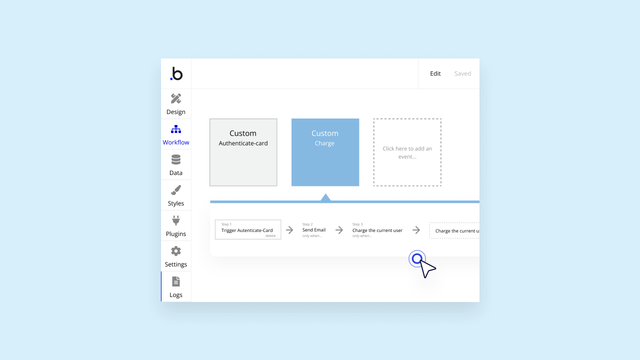
For example, if you’re taking payments in your app, you can create a custom “authorization” event in your payment workflows that checks whether a user’s credit card can be charged. With this new feature, you can return a yes/no value for whether the user can be charged and an optional text value for an error message if they can’t. Then you can use these values in a new workflow that either:

  1. Charges the user’s credit card if they’re authorized or 
  2. Sends the user an “error” email if the authorization fails to remind them to resolve the issue 

Here’s how it works:

With return data from custom events, you can:

  • Reduce the number of custom events in your app: Use a single event to return different values, instead of multiple custom events with slight variations
  • Build more modularly and resourcefully: Edit ‌reusable custom events in one place, rather than multiple
  • Understand your app better: View one custom event, rather than multiple custom events with slight variations

This also means reusable elements can now hold global functions — so workflows will act even more like traditional programming functions.

Read more in our manual and give it a try today.

Start building for free

Build for as long as you want on the Free plan. Only upgrade when you're ready to launch.

Join Bubble

LATEST STORIES

blog-thumbnail

The 7 Best Low Cost Mobile App Development Tools in 2026

Build a real mobile app affordably without compromising on control. Compare platforms that balance pricing with the ability to edit when AI gets stuck, understand what you’re building, and publish to iOS, Android, or web, so you pick the right tool the first time.

Bubble
May 08, 2026 • 16 minute read
blog-thumbnail

The 8 Best Enterprise App Builders in 2026 for Every Team

This guide compares the leading enterprise app builders for web and mobile development in 2026. You’ll see which security features matter for enterprise compliance and how to choose the right platform based on your team’s infrastructure and application requirements.

Bubble
May 08, 2026 • 15 minute read
blog-thumbnail

The 7 Best AI-Powered App Builders for Operations Teams in 2026

Discover the best AI app builders for operations teams — comparing platforms across governance capabilities, mobile deployment options, workflow transparency, and pricing models to help you choose the right tool for internal apps, partner portals, and field applications.

Bubble
May 08, 2026 • 17 minute read
blog-thumbnail

The 8 Best Software To Develop iOS Apps in 2026

The best AI mobile app builders combine AI generation with visual editing, built-in backends, and native publishing. Here's how eight platforms compare — and which fits your situation.

Bubble
May 08, 2026 • 15 minute read

What Can You Build on Bubble? 25 Examples to Inspire You

February 27, 2026 • 18 minute read

See How We Redesigned the Property Editor for Better Building

December 11, 2025 • 4 minute read

The Easiest Way to Build a Custom CRM (With AI, Updated for 2025)

October 10, 2025 • 17 minute read

The Future of Bubble’s Editor: Introducing the New Workflow Tab

October 11, 2024 • 3 minute read

Efficient App Building 101: Improving Your Workload Usage

July 01, 2024 • 3 minute read

Build the next big thing with Bubble

Start building for free


