
TL;DR: No-code development lets you build apps, websites, and internal tools visually instead of writing code, and the platform handles hosting and infrastructure. Pick a tool based on what you’re building and whether you can see and change its logic yourself, since most of an app’s value comes from the changes you make after the first version.
No-code development puts building software in the hands of people who don’t write code. If you have an idea for an app, or a process at work that’s outgrown its spreadsheet, you can build it yourself with visual tools while the platform runs the servers behind it.
AI coding tools and visual app builders both let you build without writing code, but they differ most once you need to change what you’ve built. The approach you choose now decides how well you’ll understand your app a year from now.
This guide covers how no-code works, how it compares with low-code and AI coding tools, which type of tool fits your project, and how to choose a platform and start building.
What is no-code development?
No-code development is a way of building apps and websites with visual tools instead of programming languages. You lay out pages in a drag-and-drop editor and describe your app’s logic as plain steps, like “When a customer places an order, email the seller.” The platform handles hosting and infrastructure, so you don’t need a technical background to build.
Technically, no-code is still programming. The language is visual, and it lives inside the builder itself, which works as its integrated development environment (IDE).
No-code also maps closely to the way most people already think about cause and effect: “If I click this button, this should happen.” You still have to think through that logic. What changes is the format you express it in.
How no-code development works
No-code platforms work through visual abstraction. Every action you take, like dragging a button onto a page or deciding what happens when someone submits a form, becomes part of a working app that the platform hosts and runs. Your work stays editable in the same visual form you built it in.
It’s like driving an automatic instead of a manual: The car handles the gear shifts, and you’re still the one driving.
No-code platforms take care of the underlying work at every layer of an app:
- Design and layout: You place elements on a canvas and set how they respond to different screen sizes, instead of writing HTML and CSS. What you see in the editor is what your end-users see.
- Logic: You define a trigger and the steps that follow it, instead of writing functions. For example, “When a user clicks Sign up, create a new user in the database.”
- Data: You define the kinds of information your app stores and how they relate to each other, then set who can see each piece. The platform writes and runs the database queries.
- Infrastructure: You publish your app from the editor, and the platform handles hosting, deployment, and much of the security work that would otherwise need a dedicated engineer.
Core features of a no-code platform
No-code platforms are built from a handful of core features: a visual editor, a database, visual logic, integrations, and hosting. Many now add AI generation on top.
Visual editor for design
A visual editor is where you design your app’s interface by dragging elements like text and buttons onto a page. You style them with controls instead of code and set how layouts adapt to different screen sizes. Most editors also let you save reusable components, so a header you design once looks the same everywhere.
Built-in database and data management
A built-in database stores everything your app needs to remember, like users, orders, listings, or support tickets. On most platforms, you set up your data visually, a bit like adding columns to a spreadsheet, and connect related records. For example, an order can belong to a user and contain several products.
The database is also where you control access. Privacy rules decide who can see or change each piece of data, so a customer sees only their own orders while an admin sees all of them. On Bubble, the Bubble AI Agent can create and modify data types, and it sets up privacy rules for each new one automatically, which you can review and change before you deploy.
Visual logic and workflow automation
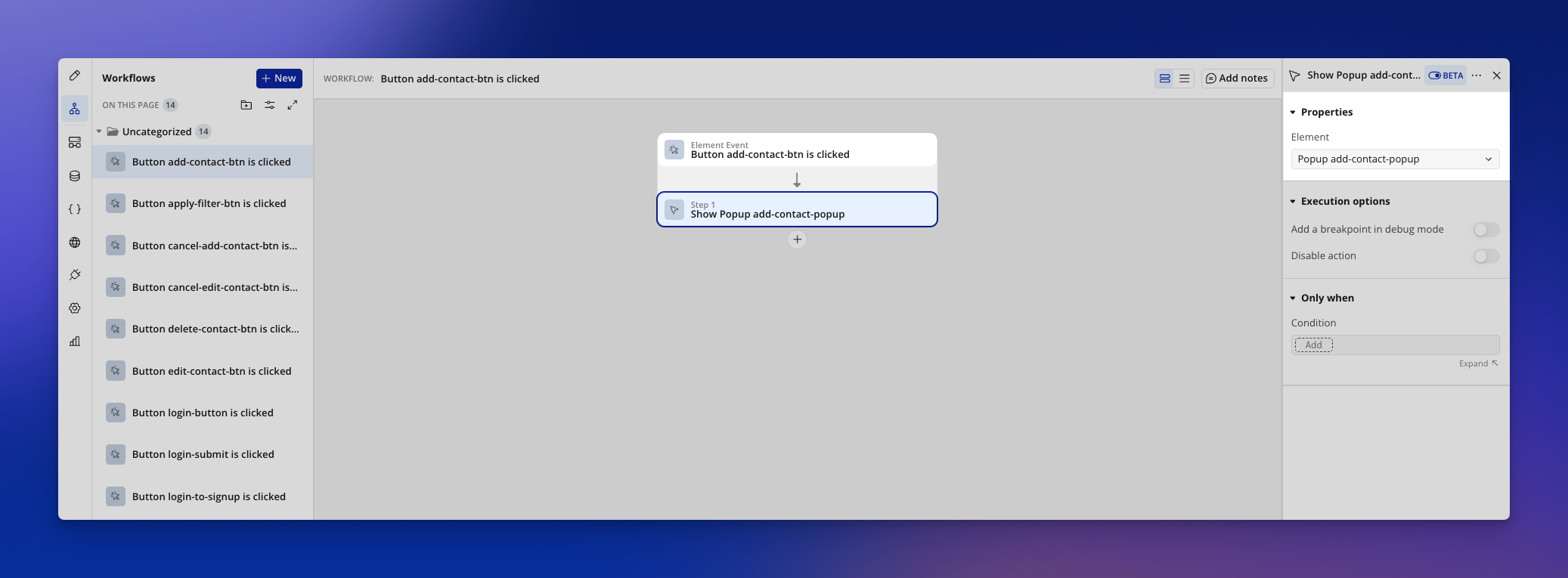
Logic is what your app does when something happens. On a no-code platform, you build it as workflows: a trigger, like a button click or a new signup, followed by the steps that run in order. A workflow might read, “When a user clicks Sign up, create a new account, then send a welcome email.”
Workflows can include conditions (“only if the order total is over $100”), scheduled steps (“send a reminder three days after signup”), and backend processes that run without anyone clicking anything. Because each step is visible, you can trace exactly why your app did what it did.
Integrations and APIs
Integrations connect your app to the tools you already use, and they usually come in two forms. Plugins are prebuilt integrations for common services, like taking payments through Stripe.
API connectors cover everything else, letting your app talk to almost any service with an API, such as sending new leads to your CRM. Some platforms also open your app up through its own API, so other software can read its data or kick off its workflows.
AI generation and editing
Many platforms now let you describe an app or feature in plain language and have AI generate a first version. What differs is where that version ends up: in a visual editor where you can read and change it, or in code you’d have to prompt again or learn to read.
On Bubble, the Agent builds right in the visual editor, so you can read and change anything it makes.
Hosting, deployment, and security
Most no-code platforms host your app for you, so you publish changes straight from the editor. Many also handle encryption and add server capacity as traffic grows, work that would otherwise fall to you or a dedicated engineer. How much control you get, and what it costs, varies widely between platforms.
No-code vs. zero-code vs. low-code vs. vibe coding
The biggest difference between no-code, low-code, zero-code, and AI coding tools is what you work with when you change your app. Zero-code tools give you templates and settings, low-code tools mix visual components with hand coding, and AI coding tools (often called vibe coding) work from prompts and generated code. No-code platforms make the design, data, and logic visual, so you can see what was built and change it directly.
| Approach | Who it's for | How it works | Trade-offs |
|---|---|---|---|
| Zero-code | People who need a website, form, or simple page | Templates and settings, with no custom logic | Quick to set up. You can't build custom logic or store complex data. |
| Low-code | Developers and technical business users | Visual components combined with some hand coding | Best suited to teams with developers on hand |
| Vibe coding | Anyone who can describe what they want in a prompt | AI generates traditional code from natural language | A first version comes together fast. Many tools let you edit the UI visually, but logic and backend changes mean another prompt or reading the code. |
| No-code | Anyone, regardless of technical background | Visual interfaces for design, data, and logic, with no code to write | Capabilities vary by platform. Advanced edge cases may use APIs, plugins, or code extensions. |
Zero-code
Zero-code tools let you build from templates and settings without defining any logic of your own. They’re the fastest way to get a simple page online, and they stop short of anything that needs stored data or custom behavior. Form builders and many website builders fit here.
Low-code
Low-code tools were built to save developers time. Platforms like Appian and Mendix give you visual building blocks and expect you to write code for anything custom, so they work best for teams with technical skills.
Big enterprise software vendors offer low-code suites too, usually aimed at IT and engineering teams.
Vibe coding and AI coding tools
AI coding tools like Lovable, Bolt, and Replit have popularized vibe coding, which means building software by describing it in natural language. They’ve inspired millions of people to build for the first time, and they get a first version up fast.
Many of these tools now let you edit the UI visually, but the logic, data model, and backend rules still live in generated code. Changing how the app works, like what happens after a payment or who can see a record, usually means prompting again or reading and editing that code.
No-code
Full no-code app builders like Bubble make every layer of an app visual, including the data and logic, so you can read how it works and change any part of it yourself. Many now add AI generation on top, which has some people wondering whether no-code still matters.
Is no-code dead? How AI is changing visual development
No-code isn’t dead. The argument goes that if AI can write your code, you don’t need a visual editor at all. In practice, AI made visual tools more useful, since you need somewhere to check and fix what the AI builds.
What AI changed about building software
You can describe what you want instead of writing code line by line and see a working screen within a single session. That speed has brought a wave of new people into building software.
AI changed no-code platforms too. On many, you can generate an app from a description and then keep building it in the visual editor.
Why seeing your app’s logic still matters after the first version
Most of an app’s value comes after launch, as you respond to customers and add features. If your app exists only as generated code, every change is another prompt. Repeated prompts get less reliable: A December 2025 study found that AI models’ debugging ability drops 60–80% after two or three attempts.
When the logic is visual, you can see what the AI built and fix it yourself. If a workflow sends the wrong email, you find that step and change it, and nothing else moves.
What can you build with no-code?
You can build almost any web or mobile app with no-code, from internal tools that manage your business data to marketplaces your customers pay to use. For a sense of the range, 6 million builders have created 8 million apps on Bubble alone. Here’s what that looks like by type of project.
Custom business apps that track and manage data
The most common no-code project is what developers call a CRUD app, short for create, read, update, and delete. It’s any app where people add records, view them, edit them, and remove them. Most business software works this way under the surface:
- Business automation apps: Tools for invoice processing, approval chains, inventory management, or a CRM shaped around your exact sales process. They replace spreadsheets and manual handoffs that break as a team grows.
- Back-office apps: Internal tools for HR onboarding, expense tracking, project management, or data entry. You can shape them around how your team already works, instead of bending your process to fit generic software.
- KPI monitoring apps: Dashboards that pull data from multiple sources, chart metrics as they update, and send alerts when thresholds are crossed. Teams get visibility without waiting on engineering to build a report.
- Customer service solutions: Ticketing systems, help desks, live chat integrations, and self-service portals. A well-built portal answers common questions before they reach your support queue.
Connections between the tools you already use
You can also use no-code to extend the software you already pay for. You could build a customer portal that pulls from your CRM, or a dashboard that brings payment and support data into one view. Projects like these often start small and end up among the most-used tools in a company.
Full-scale products and marketplaces
Beyond internal tools, builders use no-code to launch products that customers pay for, including:
- Social platforms: Communities and membership sites where people post and message each other. The community itself becomes the product.
- Marketplaces: Platforms where buyers and sellers find each other, from niche product shops to service booking apps like Airbnb or Thumbtack.
Native mobile and AI-powered apps
No-code platforms also build apps for phones and apps with AI at their core:
- Native mobile apps: iOS and Android apps that use phone features like the camera and push notifications. On some platforms, like Bubble, they share one backend with your web app, so your data stays in sync across devices.
- AI-powered apps: Apps that connect to models from providers like OpenAI or Anthropic to answer questions or automate tasks.
No-code success stories
Here are a couple of businesses built on Bubble:
- My AskAI built an AI customer support service with a two-person team. As of May 2024, it supported 40,000+ users and reached $25,000 in monthly recurring revenue.
- Messly built a marketplace that connects UK doctors with temporary shifts from medical staffing agencies. M3, a Japan-based healthcare company with a network of millions of physicians worldwide, acquired Messly on August 21, 2023.
Types of no-code tools
The main types of no-code tools are website builders, spreadsheet and internal tool builders, workflow automation tools, native mobile app builders, and full-stack app builders. They’re built for different jobs, and knowing the categories helps you avoid starting on a tool that can’t grow into what your project needs.
These categories overlap more every year as tools add AI generation and native mobile apps. Check what a tool can do today before you rule it in or out.
| Type of tool | Best for | Usually not built for | Examples |
|---|---|---|---|
| Website builders | Marketing sites, portfolios, blogs, and landing pages | User accounts, stored data, and custom logic | Webflow, Squarespace, Wix |
| Spreadsheet and internal tool builders |
Dashboards, approval flows, and data entry portals on top of existing data | Customer-facing products with complex design or business logic | Glide, Softr, Retool |
| Workflow automation tools | Moving data between apps when a trigger fires | Interfaces that end-users see and use | Zapier, Make |
| Native mobile app builders | iOS and Android apps with device features like camera and push notifications | Web apps, if the tool is mobile-only | Adalo, FlutterFlow |
| Full-stack app builders | Products you plan to run as a business, with a frontend, database, logic, and hosting in one place | One-page sites, where a website builder is quicker to learn | Bubble |
Examples last checked October 6, 2026.
Website builders
Website builders are for sites people visit and read, like marketing pages and portfolios. They make it easy to get a good-looking site live, but they usually stop short of user accounts or anything that needs stored data.
What’s the difference between a website builder and a no-code app builder?
A website builder shows information to visitors. A no-code app builder lets people do things with data, like log in or book an appointment, and that takes a database and workflow logic behind the scenes.
A quick test: If two people should see different things on the same page, you’re building an app. Expect more to learn when you make the switch, since you’re adding data and logic on top of page design.
Spreadsheet and internal tool builders
These tools turn data you already have, like a spreadsheet or SQL database, into an interface your team can use. They’re a good fit for internal dashboards and approval flows, and less of one for customer-facing products with complex logic.
Workflow automation tools
Automation tools run in the background, moving data between apps when something happens. When a customer fills out a form on your website, for example, a new row can appear in your spreadsheet. There’s no interface for end-users, so these tools usually work alongside an app builder.
Native mobile app builders
These tools build iOS and Android apps that can use the camera, push notifications, and other phone features, and they help you publish to the app stores. Some are mobile-only, so if you also need a web app, you may end up with a second tool and a separate backend.
Full-stack app builders
Full-stack builders put the whole app in one place: the visual editor, database, logic, and hosting. They take more learning than a website builder, and they’re where to look if you’re building a product you plan to run as a business. Bubble works this way for both web and native mobile apps, on one shared backend.
How Retool, Glide, and Bubble compare
Retool, Glide, and Bubble often come up when a small business needs internal tools and customer-facing apps on one platform, or a mobile app that shares data with a web app.
Retool is built mainly for internal tools, and Glide builds business apps from spreadsheets and the tools a team already uses. Bubble covers customer-facing products as well as internal tools, with web and native mobile apps on one backend.
| Built for | Customer-facing apps | Native mobile | Backend and data | |
|---|---|---|---|---|
| Retool | Internal tools for engineering, data, and operations teams |
External apps |
iOS and Android apps for field teams, or a PWA |
Connects to databases and APIs, plus its own database |
| Glide | Business apps built from spreadsheets and existing tools |
Customer portals |
No. Responsive apps for desktop and mobile |
Spreadsheets, databases, and business tools, plus Glide Tables |
| Bubble | Customer-facing products, marketplaces, SaaS, and internal tools |
Yes |
iOS and Android from the same editor as web |
Built-in database, backend workflows, and privacy rules, shared across web and mobile |
Last checked October 6, 2026.
If one app has to serve both your team and your customers, or your mobile app needs the same data as your web app, compare where each tool keeps the backend, since that’s the part both projects share.
Who should use no-code development?
No-code has widened who gets to build software. No-code works for founders and industry experts with no coding background, developers who would rather skip routine work, and organizations that want more of their teams building.
Non-technical builders
If you’re a founder without a technical co-founder, you can build your product yourself and change it the day a customer asks for something. If you’ve spent a decade in an industry, you can build a tool that works exactly the way that industry does. People who build this way inside a company are sometimes called “citizen developers.”
If you’re new to building, Bubble Academy walks you through your first app.
Traditional software developers
Developers use no-code to skip the routine work. Standard pages, data models, and workflows come together visually, leaving more time for the problems that need custom code. On Bubble, you can still extend an app with your own code or API integrations when the visual tools don’t cover something.
Organizations and enterprise teams
Organizations use no-code to build internal tools and custom apps without adding to the engineering backlog. Look for enterprise features like SOC 2 compliance, single sign-on (SSO), and customizable privacy rules, which help an app pass security review.
When teams outside engineering can build, IT gets more people contributing to software without losing sight of it. Reviewers can read the logic before any change ships, and engineering stops being the bottleneck for every internal tool.
Benefits of no-code development
No-code puts software in more people’s hands and gives developers better tools. The main benefits of no-code development are lower costs, faster launches, closer collaboration, more engineering time for hard problems, and less shadow IT.
More people can build software
Building software used to take years of learning a programming language. No-code lowered that bar, and AI has lowered it further, so the distance between an idea and a working app has never been shorter.
Smartphones did something similar for photography: Millions of people with no training started taking and editing great photos. No-code gives far more people the tools to build apps their business can run on.
Lower development costs
Developers are expensive. The median US software developer salary was $135,980 in May 2025, and most apps need more than one specialist. If you’re bootstrapping your startup or spending outside funding, every dollar you save on development extends your runway.
AI coding tools make it cheap to get started, but maintaining code you can’t read gets expensive when every change needs a developer. With no-code, non-technical staff can build and maintain their own tools, so you hire fewer developers and costs stay lower over time.
Faster time to market
No-code cuts out much of the coding and infrastructure setup, so you can launch a minimum viable product (MVP) sooner. The bigger advantage comes after launch, when you can keep testing and refining the app yourself instead of handing every change to engineering. Look for a platform where your first version is already editable based on what users tell you.
Improved collaboration between teams
When designers and non-technical teammates can make changes directly, the people closest to a problem can often fix it themselves. Because the logic is visual, a new teammate can open a project midstream and follow what it does.
Bubble’s paid plans include version control, which shows teams who changed what and when and lets them roll back when needed.
More time for engineers to focus on complex work
The platform handles repetitive work like CRUD logic and CSS layouts, which saves engineers a lot of busywork. Because the app stays visual, anyone on the team can maintain routine features, and engineers can focus on the problems that need them.
Reduced shadow IT
Shadow IT is the unapproved software that piles up when teams adopt one-off tools on their own. Each one is a potential security risk, often one IT doesn’t know exists.
People reach for those tools when getting dev time feels too slow or not worth asking for. No-code gives teams a way to build what they need on a platform IT has already approved, with the same security baseline for every tool.
Common concerns about no-code development (and the reality)
Many criticisms of no-code come from outdated information or a bad experience with a limited tool. Some concerns are fair, though, and knowing where the limits are will help you choose well.
Integration capabilities
Most no-code platforms connect to popular services, and the better ones let you reach almost anything through an API. Check that the specific services you rely on are covered before you commit.
On Bubble, plugins cover popular services, and the API Connector reaches almost any JSON-based RESTful API. Other apps can connect to yours through the Bubble API.
The Agent can set up API calls and install plugins for you, and it walks you through anything that still needs your review. You can also add your own code, such as JavaScript, when you need it.
Customization and complexity
No-code has a reputation for simple sites and lightweight apps, but that picture is out of date. Builders now run whole businesses on it, and production software for paying customers is well within reach on the right tool.
On Bubble, a flooring company runs its entire operation on Floor Authority, a custom ERP its CEO built himself, supporting $24 million in annual revenue as of March 2025. SuiteOp runs its hospitality operations platform on web and native mobile from one backend. Browse more Bubble apps to see the range.
No-code does have limits. Highly specialized work, like training your own machine learning models or building low-level system software, is a better fit for traditional code, and complex apps sometimes need engineering help on top. No-code works best for software that ends in something people see and use.
Scalability
As your app grows, it needs more server power, and since a no-code app runs on the vendor’s infrastructure, people often worry it won’t keep up. Bubble is built to scale with your app, and Bubble apps process more than $1 billion in transactions a year.
You’ll still want to follow Bubble’s performance guidance and keep an eye on your app’s workload. The Agent can explain how your app is configured, and if you need more control, the Enterprise plan offers a dedicated server.
Security and privacy
You may have heard that no-code platforms aren’t secure enough. That worry comes down to whether you can trust a platform’s built-in security, and the answer varies by platform.
On Bubble, security comes built in with enterprise-grade standards. Privacy rules are visual, so you decide who can see each piece of data, down to the field, and you can review them before you deploy.
On paid plans, the security dashboard scans your app and points you to each fix. The Starter plan covers core checks like missing privacy rules and exposed credentials, and the Growth, Team, and Enterprise plans add advanced checks like compromised API tokens and database exposure risks.
Bubble is SOC 2 Type II compliant and complies with GDPR. Its features can help you meet your own privacy obligations, as long as you set up your app correctly.
Larger organizations put Bubble through formal security reviews. Seagate’s Lyve team, for example, built its internal admin console on Bubble after it passed the company’s review.
Ownership and lock-in
Imagine if Microsoft owned everything you wrote in Word and you could never move it to another word processor. That’s how some people picture no-code.
Platforms differ, so read the terms. On Bubble, you own your app’s data and design, and Bubble owns only the platform. You can export your data and a Bubble app JSON file, and because Bubble apps run on Bubble, moving to another platform would mean rebuilding the app’s logic.
How to choose a no-code development tool
To choose a no-code development tool, start with what you’re building and whether you can see and change the app’s logic yourself. From there, compare integrations, security, and cost, along with the community and resources behind each platform.
There are several great no-code app builders on the market, and the list keeps growing, so use this checklist to weigh your options.
| Criterion | What to check |
|---|---|
| Project fit | The platform's category matches your project, and it covers web and mobile if you need both. |
| Visible logic | You can open an app, read what happens when a user signs up, and change one step directly. |
| Integrations | There's a supported path to the specific services you depend on, like an API connector or a maintained plugin. |
| Security | The vendor documents its compliance, encryption, and access controls, and you can set who sees each piece of data. |
| Budget | You know what you'll pay once the app is live and growing, beyond the entry price. |
| Reputation | You can find success stories that resemble your project. |
| Community | There's an active forum where builders and the vendor's team answer specific questions. |
| Ecosystem | A marketplace of plugins, integrations, and templates exists beyond the vendor's own tools. |
| Learning resources | Documentation, courses, and how-to videos are there to help you through the learning curve. |
Start with what you want to build
Most no-code platforms are built for specific use cases. Some focus on websites, others on mobile apps, internal tools, or a single industry, and some lean into design while others prioritize data or automation.
Match your project type to the right category before you compare individual tools.
If you’ll need both web and mobile, look for a platform that builds both from one editor with a shared backend, so you aren’t maintaining two apps. Bubble supports responsive web apps and native iOS and Android apps from the same editor.
Check whether you can see and change the logic
Many tools make the screens visual, and fewer extend that to the logic and data. Before you commit, open a sample or generated app and find out what happens when a user signs up.
If you can read each step and change one of them directly, you’ll be able to fix problems and make precise changes as your app grows. If the only way to change behavior is another prompt or editing code, factor that into how you’ll maintain the app later.
Compare integration capabilities
Your platform determines which tools your app can connect to. Not every platform offers APIs, and those that do vary in how well they document and support them. If a specific integration is critical, confirm that the platform has a clear, supported path to it, beyond a third-party plugin that may or may not be maintained.
On Bubble, the API Connector, the Bubble API, and the plugin marketplace cover most integrations, and the Agent can set up API integrations for you.
Evaluate their security features and practices
How much security matters depends on what you’re building. A proof-of-concept site with no user accounts carries little risk. An internal business application for a large organization needs security practices you can verify.
Software needs several layers of security, and since you aren’t coding them yourself, you’re relying on your vendor to protect your data and your end-users. A secure no-code platform should be clear about its capabilities, its compliance, and the protections it has in place.
Beyond SOC 2 Type II compliance and privacy rules, Bubble runs penetration tests at least once a year and protects apps against DDoS attacks. The security dashboard’s “Fix in the editor” button takes you directly to each issue it finds.
Bubble uses HTTPS encryption for data in transit. For the General Data Protection Regulation (GDPR), the Bubble Manual has guidance on handling your users’ data and privacy securely.
If you’re evaluating an enterprise solution, Bubble’s Sales team can walk you through Enterprise plans, which can include dedicated infrastructure and enhanced controls.
Consider your budget
Saving on development is one of the main reasons to choose no-code, but platform costs still vary widely. Prices often scale with the number of collaborators, the resources your app uses, and the features you need. Look at what you’ll pay once your app is live and growing, beyond the entry price.
Most no-code builders let you start at no cost. On Bubble, the Free plan lets you generate an app with the Agent and keep working on it, with a monthly AI credit allowance for Agent requests. Building and editing in the visual editor doesn’t use credits, and when you’re ready to launch or want more from the Agent, you move to a paid plan.
Check out their market reputation
Find out who else has used the builder you’re considering and how it worked out for them. Notice who it’s built around, too. A tool popular with hobbyists may not hold up for a business app, and one built for developers may assume skills you don’t have.
Before you commit, look for success stories that resemble your project. Bubble users are in more than 220 countries and territories, building original ideas and bringing proven ideas to new niches. See some examples of what they've launched →
Look for an active community
When you get stuck, a busy forum is often where you’ll find the answer. Look for one where builders and the vendor’s team trade answers to specific questions, and where older threads are worth searching.
A quiet or missing forum leaves you fewer places to get unstuck, and it can be a sign that few people use the platform.
On the Bubble Forum, builders trade tips and show off what they’ve made, and the Bubble team posts product updates.
Assess the broader ecosystem
A healthy platform attracts agencies and plugin makers, and the more of them there are, the more ways you have to extend your app without building everything yourself.
Look for a marketplace of plugins, integrations, and templates, where third parties offer what the vendor doesn’t.
Explore their resources
Every platform has a learning curve, and good documentation and tutorials make it a lot shorter. Look for how-to guides and videos that match what you’re trying to build.
On Bubble, you’ll find step-by-step guides in the Bubble Manual and on the Bubble Blog, plus templates to start from and videos on the Academy.
Build with AI on Bubble without giving up control
Bubble is the fully visual app builder where anyone can build software, understand every part of it, and control every detail without code. It makes your web app, native mobile app, and the database behind them visible and editable, from the design to the programming logic and privacy rules.
Understand how your app works
Most AI app builders stop at making the screens visual. On Bubble, the logic and data are visual too. Workflows read as plain-language steps, like “When someone signs up, create their account, then send a welcome email,” and you can see exactly what your app does.
When something behaves unexpectedly, you can trace it to the step responsible and fix it yourself. When a new teammate joins, they can follow the logic without someone translating code for them.
Refine every layer with the Agent or by hand
Describe your idea to the Agent, and it starts with a planning session, asking questions to shape the plan before it generates your UI, workflows, database structure, privacy rules, and logic. From there, keep chatting with the Agent to add features, or open the visual editor and change something yourself. If you already use an AI tool like Claude or Codex, the Bubble MCP (beta) connects it to your app, and everything it builds stays visual and editable too.
Use AI when you want speed or edit by hand when you want precision. The Agent also explains what it built as it goes, so you learn your app while you work on it.
Grow on one platform across web and native mobile
With Bubble for native mobile apps, you build iOS and Android apps in the same editor you use for web, on one shared database and backend. You can also use the Agent to generate your mobile app (beta). Hosting and security come built in, so the app you launch is the app you keep growing, without juggling separate tools and vendors.
Bubble does have a learning curve, and the Agent’s explanations and Bubble Academy courses are there to help you through it. Bubble apps run on Bubble, so it’s a platform you choose to grow on for the long term.
How to get started with no-code
Learn the key concepts
Start with the beginner courses in Bubble Academy, which cover the core concepts of the Bubble editor. As you build, you can ask the Agent to explain anything you don’t understand yet.
Try a no-code development course
For a hands-on approach, work through a Bubble Academy course that builds a project from start to finish. You can also generate your first app with the Agent and ask it to walk you through how each part works.
Start building your first no-code app
If you’re ready to build and looking for a starting point, describe an idea to the Agent and refine the plan together. For inspiration, browse this list of no-code app examples or the Bubble Showcase. You can also explore the plugins in the Bubble Marketplace to see how other builders have extended Bubble and how to publish your own.
Start building your vision today
No-code development has widened who can build software and how quickly an idea becomes something people can use. The choice that matters most is a platform where you understand what you’ve built and can keep changing it as your business changes.
On Bubble, you shape your idea with the Agent in a planning session, then refine any part of the app yourself until it works the way you imagined.
Frequently asked questions about no-code development
What is a citizen developer?
A citizen developer is someone outside a company’s engineering team, often in operations, product, or business roles, who builds software for their own team with no-code or low-code tools. Many organizations support citizen developers by approving a platform that IT can oversee.
Will no-code replace software developers?
No-code changes what developers spend their time on more than it replaces them. Routine pages, data models, and workflows move to visual tools more people can maintain, and developers focus on custom integrations, performance work, and specialized features, often extending visual apps with code.
Do I own the apps I build on a no-code platform?
It depends on the platform, so check the terms. On Bubble, you own your app’s data and design and can export your data and a Bubble app JSON file, and since apps run on Bubble, moving elsewhere would mean rebuilding the application logic.
How do I become a no-code developer?
Learn the core concepts of visual development (responsive design, database structure, and workflow logic), then build a project from start to finish on a fully visual platform like Bubble with the help of the beginner Bubble Academy courses and the Agent’s explanations. From there, no-code skills can support freelance client work or in-house roles in product, operations, and IT.
Can I move an app built with an AI coding tool to a no-code platform?
Not by importing the code, since moving to a visual platform means rebuilding the app. Your existing version still works as a detailed spec for screens, data, and features, and once the app is visual, you can read and change every part of it yourself.
What’s the difference between no-code and low-code?
No-code platforms let you build the design, data, and logic visually with no code to write, while low-code platforms pair visual components with hand coding and are geared toward developers and technical users. Low-code works best for teams with developers on hand.
Build for as long as you want on the Free plan. Only upgrade when you're ready to launch.
Join Bubble


