MARKETPLACE
PLUGINS
DMD PDF CONJURER ALTERNATIVE
DMD PDF Conjurer Alternative logo

DMD PDF Conjurer Alternative

Published March 2026
   β€’    Updated today

Plugin details

Generate PDFs entirely within your Bubble app - no external APIs, no per-PDF fees, no data leaving your app. DMD-to-PDF uses a simple markdown-like syntax to create professional documents in a single workflow action.
πŸ”’ Privacy-First PDF Generation

Unlike other PDF plugins that send your data to external servers, DMD-to-PDF generates PDFs locally - either in the user's browser or on Bubble's backend. Your sensitive data never leaves your infrastructure.

β€’ No external API calls - PDFs are generated on-device or on Bubble servers
β€’ No per-PDF fees - generate unlimited documents
β€’ No data exposure - perfect for invoices, contracts, medical records, and confidential documents
β€’ Works offline - client-side generation works without internet (after initial load)


⚑ Simpler Than PDF Conjurer

Tired of building 20+ workflow actions just to create a single PDF? DMD-to-PDF takes a different approach:

β€’ One action, one PDF - write your entire document in a single text field using simple DMD markup
β€’ No complex workflows - no "Initialize β†’ Add Text β†’ Add Table β†’ Add Image β†’ Conjure" chains
β€’ Dynamic content - use Bubble's dynamic data directly in your DMD text
β€’ Easier maintenance - edit your document template in one place, not across dozens of actions
β€’ AI-assisted template creation - use the interactive playground to design your PDF, or pass the llms.txt file to any AI assistant to generate DMD templates from your requirements


⚑ Main Features

β€’ Rich text formatting
Bold, italic, underline, strikethrough, superscript, subscript, and inline code.
β€’ Headings & structure
Six heading levels, paragraphs, blockquotes, and horizontal rules.
β€’ Lists
Bullet lists, numbered lists, alphabetical lists, and nested lists.
β€’ Tables
Simple table syntax with automatic column sizing and custom styles.
β€’ Multi-column layouts
Side-by-side content with configurable column gaps.
β€’ Images
Embed images from URLs with size and alignment options.
β€’ Links
Clickable hyperlinks in your PDF documents.
β€’ Page control
Page breaks, vertical spacing, and custom page sizes/orientation.
β€’ Headers & footers
Dynamic headers and footers with page numbers ({pageNumber} / {pageCount}).
β€’ Custom styles
Define reusable styles for consistent document formatting.
β€’ Frontend & backend generation
Generate PDFs client-side for instant downloads or server-side for storage/email.


⭐ Pro Features

The Pro license is a small yearly fee to cover work hours maintaining and improving the library. One single license can be used on 5 domains (apps), check it out at Pro License page:

β€’ 120+ curated fonts - Access a library of 120 premium fonts loaded automatically from our CDN. Just use the font name in your styles.
β€’ Custom fonts - Load your own TTF fonts from any URL for complete brand consistency.
β€’ Block styling - Apply custom styles to tables, lists, blockquotes, and other block elements. Free edition only supports inline text styles.
β€’ Watermarks - Add text watermarks to all pages.
β€’ Background layers - Custom background content behind your document.


πŸ“‹ How It Works

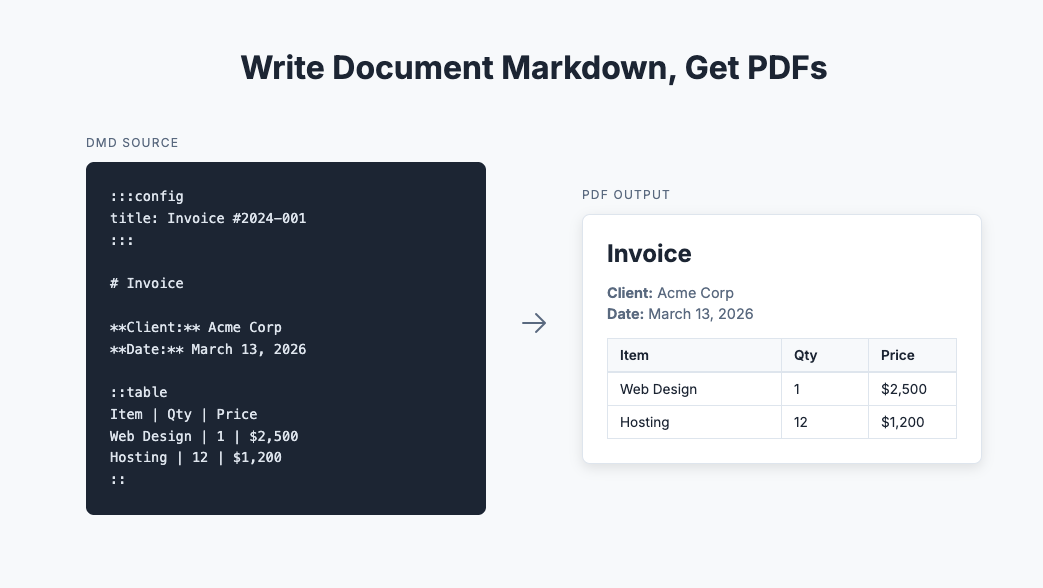
Write your document using simple DMD markup:


Call the "Create PDF" action with your DMD content
Done! PDF is generated and ready for download or storage


Documentation
User guide, Reference and Playground with examples available at dmdlang.dev

Support
Get in touch: [email protected]

Free

For everyone

5.0 stars   β€’   1 ratings
37 installs  
This plugin does not collect or track your personal data.

Other actions

Platform

Web

Contributor details

The JSA logo
The JSA
Joined 2020   β€’   11 Plugins
View contributor profile

Instructions

DMD-to-PDF Plugin Setup Guide
Complete instructions for installing and using the plugin in your Bubble app.

1. Install the Plugin
Go to your Bubble app's Plugins tab and install the plugin


2. Configure License Keys (Optional)
If you have a Pro license, add your keys in the plugin settings:

β€’ client_key - Pro license key for client-side (browser) PDF generation. Enables custom fonts, watermarks, and other Pro features on the frontend.
β€’ server_key - Pro license key for server-side PDF generation. Required for Pro features in backend workflows.

Note: The plugin works without license keys using the free tier. Pro features will be disabled.


Client-Side PDF Generation (Frontend)

Use client-side generation for instant PDF downloads. PDFs are generated directly in the user's browser.

1. Add the Element to Your Page

1. In the Design tab, search for "PDF" in the Visual Elements panel
2. Drag the element onto your page
3. The element is invisible at runtime - it only provides PDF generation functionality

Available Functions

Create PDF
Generates a PDF from DMD markup content.

Inputs:
β€’ Content (text) - The DMD markup source to convert to PDF. Required.
β€’ Download (yes/no) - If Yes, the PDF downloads immediately to the user's device.
β€’ Save to (text) - Your Bubble app URL (e.g., https://myapp.bubbleapps.io). If provided, uploads the PDF to Bubble storage.
β€’ Attach to (thing) - A Bubble thing to attach the PDF as a private file. Makes the file private and linked to this thing.


Register Image
Pre-loads an image so it can be referenced by name in your DMD content. Useful if you will use the same image in many places in the Document or add the same image to many documents. You can do this on page load.

Inputs:
β€’ Name (text) - Alias to reference this image in DMD markup (e.g., [alt]{img: name}).
β€’ Image (text) - URL of the image to preload.


Register Font (Pro Only)
Pre-loads a custom font for use in your documents. We recommend you do this on the event "Enabled PRO" to make sure the Pro license is enabled when you try to load a font, avoiding an error.

Inputs:
β€’ Name (text) - Font family name to use in DMD styles (e.g., font: MyFont).
β€’ Normal (text) - URL to the regular weight TTF file. Required.
β€’ Bold (text) - URL to the bold weight TTF file. Optional, falls back to normal.
β€’ Italics (text) - URL to the italic TTF file. Optional, falls back to normal.
β€’ Bold Italics (text) - URL to the bold-italic TTF file. Optional, falls back to bold or normal.


Element States
β€’ PDF url (text) - The URL of the uploaded PDF in Bubble storage. Only set when "Save to" is provided.
β€’ Error (text) - Error message if PDF creation or upload failed.

Element Events
β€’ Enabled pro - Triggered when a Pro license is successfully validated on initialization.
β€’ Was created - Triggered when a PDF is successfully created and uploaded to Bubble storage.
β€’ Threw an error - Triggered when PDF creation or upload fails. Check the error state for details.


Server-Side PDF Generation (Backend)

You can use the actions: Create PDF, Register Font (Pro Only) and Register Image. They are similar to the respective actions on the frontend.


Tips & Best Practices

β€’ Use dynamic data - Insert Bubble dynamic expressions directly in your DMD content. It's just text!
β€’ Test in playground first - Use dmdlang.dev playground to design and preview your PDF before implementing in Bubble.
β€’ Pre-register images - For images used repeatedly, register them once on page load for better performance.
β€’ Backend for automation - Use server-side generation for scheduled reports, email attachments, and API workflows.
β€’ Check for errors - Always handle the "threw_an_error" event to show users meaningful error messages.

Troubleshooting

PDF not generating?
β€’ Check the error state on the element or the error output from server actions
β€’ Verify your DMD syntax in the playground

Custom fonts not working?
β€’ Ensure you have a Pro license key configured
β€’ Call Register Font BEFORE Create PDF
β€’ Verify the font URL is accessible (CORS-enabled)

Images not appearing?
β€’ Use full URLs (https://...) for images
β€’ Register images before generating the PDF
β€’ Check that image URLs are publicly accessible

Need Help?

β€’ Documentation: dmdlang.dev
β€’ Email: [email protected]

Types

This plugin can be found under the following types:
Background Services   β€’   Element   β€’   Event   β€’   Action

Categories

This plugin can be found under the following categories:
PDF   β€’   Visual Elements

Resources

Support contact
Documentation
Tutorial

Rating and reviews

Average rating (5.0)

Ferramenta excepcional!
April 16th, 2026
Ferramenta completa. DocumentaΓ§Γ£o Γ³tima, ambiente de sandbox para testes e suporte rΓ‘pido e preciso. Recomendo!
Muito obrigado!! (plugin author)
April 16th, 2026
  β€’  
The JSA
Bubble