TL;DR: This guide shows you how to build a production-ready project management app using Bubble's AI-assisted development approach. You'll create task management, team collaboration, real-time notifications, and secure user permissions — then deploy to web and nativemobile platforms. Use the Bubble AI Agent when you want speed, switch to visual editing when you need precise control.
Project management apps solve specific problems: clarifying who owns each task, preventing missed deadlines through clear priorities, and keeping project files accessible without searching across multiple tools. The real challenge isn't starting — it's building something flexible enough to evolve as your requirements change.
This guide walks you through building a complete project management app from planning to deployment. You'll define your data model, set up role-based permissions, build workflows for task creation and assignment, add collaboration features, and deploy to web and mobile. By the end, you'll have a working app with real users testing it.
Plan your project management app features and scope
Before writing your first AI prompt or opening the visual editor, define what your app needs to accomplish. Start by identifying the specific problems you're solving — maybe your team loses track of task ownership, misses deadlines because priorities aren't visible, or wastes time hunting for files across different tools.
Your minimum viable product should solve one core problem exceptionally well rather than attempting everything at once. This focused approach gets you to launch faster and generates clearer user feedback.
Choose the project management model that fits your use case:
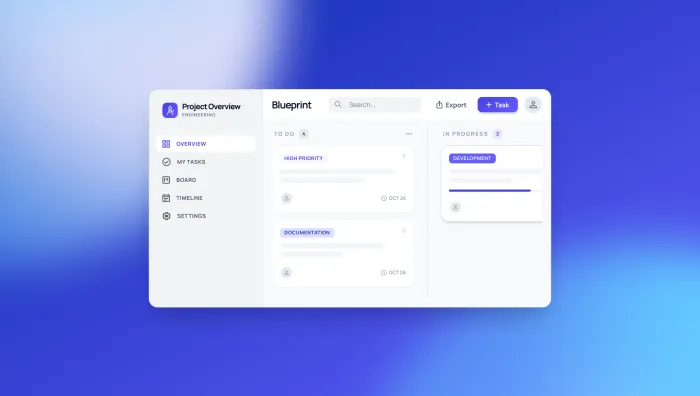
- Task-focused apps use kanban boards to visualize work moving through stageslike "To Do," "In Progress," and "Complete." These apps excel when teams need to spot workflow bottlenecks quickly and move tasks between stages with minimal friction. Trello and Asana's board view exemplify this approach — simple, visual, and centered on task status.
- Resource-heavy apps emphasize team capacity and workload distribution by showing who's overloaded and who has availability. These tools help managers balance work across team members and prevent burnout. They typically include capacity charts, workload percentages, and availability calendars — essential when managing multiple projects with shared resources.
- Collaboration-focused tools prioritize communication through comments, @mentions, file sharing, and real-time notifications. These apps treat project management as an ongoing conversation, keeping all context, decisions, and files centralized instead of scattered across email threads and chat tools. They work best for teams where alignment and communication matter more than rigid task tracking.
Most teams need elements from all three approaches, but identifying your primary focus helps you build the right foundation first.
Essential features for your minimum viable product
Your first version should include six core features that create a complete, usable task lifecycle:
- Projects — containers that group related work around specific goals or deliverables
- Tasks — individual work items with clear descriptions of what needs to be done
- Assignments — explicit ownership linking each task to the team member responsible for completion
- Due dates — deadlines that create accountability and help teams prioritize work
- Status tracking — visual indicators like "To Do," "In Progress," and "Complete" that show progress at a glance
- Comments and files — collaboration tools that keep all context centralized instead of scattered across communication channels
Start with a single project view — choose either a list, kanban board, or timeline based on your primary use case. Add alternative views later once you understand how teams actually use your app. Apply the same principle to user roles: begin with two or three simple roles like Admin, Manager, and Team Member rather than building a complex permission system upfront.
User roles and permission structure to plan upfront
User roles define the different types of people who use your app and what they can see and do. Planning these roles before you build prevents security issues and simplifies development.
Define clear permissions for each role:
- Admins have complete system access — they view all projects across the organization, create and delete projects, modify any task regardless of assignment, manage user accounts and permissions, and access system settings. Reserve this role for IT staff or executive leadership who need full oversight and control.
- Managers see all projects assigned to their department or team. They create new projects within their scope, add and assign tasks to team members, adjust deadlines and priorities, and view team performance reports.They can't access projects outside their team or modify system-wide settings, which keeps data organized by department while giving managers the control they need.
- Team Members see only tasks assigned directly to them and projects where they're listed as participants. They update task status, add comments and files to their tasks, and view project timelines for context — but they can't create new projects, assign tasks to others, or see work outside their scope. This focused view reduces noise and helps team members concentrate on their deliverables.
- Guest or Client roles have read-only access to specific projectsyou share with them.They view project progress, see task status, and download shared files — but they can't create tasks, modify anything, or see projects you haven't explicitly shared. This role works well for external stakeholders who need visibility without editing permissions, like clients reviewing deliverables or vendors tracking project milestones.
Document these permissions clearly — you'll reference them constantly when building privacy rules and workflows. Clear role definitions also simplify testing because you'll know exactly what each user type should and shouldn't access.
Generate your app foundation with AI
Bubble AI generates your starting point in minutes — working pages, data types, and basic workflows that you can immediately test and refine. After generation, use the Bubble AI Agent to continue adding features through conversation, or switch to the visual editor when you want precise control over every detail.
Start by describing your core workflow in plain language. For example: "Build a project management app where managers create projects and tasks, assign tasks to team members with due dates, and team members update task status and add comments."
This prompt gives AI the essential information about user roles, core actions, and basic data relationships. Include specific details about your data structure — mention that projects contain multiple tasks, tasks have assignees and due dates, and users can comment on tasks. The more clearly you describe relationships between data, the better your generated foundation will be.
Write effective prompts to generate your app foundation
Effective prompts balance specificity with simplicity. Describe what users do rather than how features should work technically. Instead of "create a normalized database schema with foreign key relationships," say "projects contain multiple tasks, and each task tracks who it's assigned to and when it's due."
Review the generated blueprint before accepting it. AI shows you what data types, pages, and workflows it plans to create. Look for missing connections — tasks that don't link to projects, or assignment workflows that don't notify users. Catching these gaps now saves significant time later.
Review and refine your generated foundation
After Bubble AI generates your app, examine the data model first. Verify that projects connect to tasks, tasks connect to users, and all relationships make sense. If something seems off, ask the Bubble AI Agent to explain what it built or help you fix issues — it understands your entire app structure and data relationships.
Review the generated workflows next. Workflows are automated actions that happen when users interact with your app — like sending a notification when a task gets assigned. AI typically creates basic actions like "create new task" or "assign task to user," but it might miss edge cases like "what happens if someone tries to delete a project with active tasks?"
Don't regenerate unless the foundation is fundamentally wrong. Small issues like missing fields or incomplete workflows are straightforward to fix — ask the Bubble AI Agent to make changes or edit directly in the visual editor.
Set up your data model and user permissions
Your data model defines how information connects in your app. Before building workflows or interfaces, establish what data you're storing and how it relates.
Start with your core entities — the types of information you need to store. For a project management app, these include Projects, Tasks, Users, Comments, and Files. Each entity becomes a data type in your database.
Projects need fields for name, description, start date, end date, and status. Tasks need title, description, assignee, due date, priority, and status. Define relationships between data types carefully: a project has many tasks (one-to-many), a task belongs to one project (many-to-one), and tasks can have many users assigned while users can be assigned to many tasks (many-to-many). These connections enable features like "show all tasks in this project" or "show all projects this user is assigned to."
You can ask the Bubble AI Agent to create or modify your data types as you build — it automatically generates privacy rules to secure your database. Or create them manually in Bubble's database editor for precise control over every field and relationship.
Structure projects, tasks, users, and file relationships
Whether you use the Bubble AI Agent or create data types manually in Bubble's database editor, you'll need these core structures.
For a Project data type, include these fields:
- Name (text) — the project title
- Description (text) — details aboutproject goals and scope
- Start date (date) — when work begins
- End date (date) — the project deadline
- Status (option set) — current state like Active, On Hold, or Complete
- Owner (User) — who created the project
The owner field links projects to the user who created them. You'll use this connection to show users only their projects and enforce permissions.
For a Task data type, include these fields:
- Title (text) — the task name
- Description (text) — what needs to be done
- Assignee (User) — who's responsible
- Project (Project) — which project this task belongs to
- Due date (date) — when it needs to be completed
- Priority (option set) — urgency level like High, Medium, or Low
- Status (option set) — current state like To Do, In Progress, or Complete
The assignee field connects tasks to users while the project field connects tasks to projects. These relationships make your app functional — they enable filtering tasks by project, showing a user's assigned tasks, or displaying all tasks due this week.
Add Comment and File data types for collaboration features.
For Comments, include:
- Content (text) — the comment text
- Author (User) — who wrote it
- Task (Task) — which task it's attached to
- Created date (date) — when it was posted
For Files, include:
- Name (text) — the file name
- File (file) — the actual uploaded file
- Uploader (User) — who uploaded it
- Task (Task) or Project (Project) — where it's attached
Store the actual file using Bubble's file storage system (allocation varies by plan: Free 0.5GB, Starter 50GB, Growth 100GB, Team/Enterprise 1TB; additional storage available at $3 per 100GB for paid plans).
Build privacy rules that enforce role-based access
Privacy rules are security settings that control who can view and modify each data type. When the Bubble AI Agent creates data types, it automatically generates privacy rules to secure your database. You can also create and refine privacy rules manually in the visual editor to ensure users only see data they're authorized to access.
Bubble provides a built-in privacy rules checker in the security dashboard with step-by-step remediation instructions.
Start with your Project data type. Team Members should only see projects they're assigned to, Managers should see all projects for their team, and Admins should see everything. Create a privacy rule that says "When Current User's role is Team Member, this Project is searchable when Project's team contains Current User."
Set up similar rules for Tasks. Team Members see tasks assigned to them or tasks in projects they belong to. Managers see all tasks for their team. Admins see all tasks. Each rule adds a layer of security that prevents data leaks.
Test privacy rules by previewing your app as different user types. Create test accounts for Admin, Manager, and Team Member roles, then verify each role only sees appropriate data. This testing step is critical — broken privacy rules can expose sensitive project information to unauthorized users.
Build core workflows and user interface
Workflows bring your app to life — they're the logic that determines what happens when users interact with your app. When someone creates a task, a workflow sends a notification to the assignee, adds the task to the database, and updates the project dashboard. When they mark a task complete, another workflow changes the status, logs the completion time, and notifies the project manager.
Your interface should make these workflows intuitive. Dashboards show project overviews, task lists let users filter and sort, and detail pages display all information about a specific project or task.
Create task lifecycle workflows from creation to completion
The task lifecycle starts when someone creates a task and ends when it's marked complete. You can ask the Bubble AI Agent to "Create a workflow that adds a new task when the Create Task button is clicked" — or build it manually in the workflow editor.
The workflow should use form inputs to create a new entry in your Tasks database and set the created date to Current date/time so you can track how long tasks take to complete.
Add assignment notification workflows. When someone assigns a task or changes the assignee, send an automated email to the new assignee with task details, due date, and a direct link to the task in your app. These notifications prevent tasks from falling through the cracks.
Build status change workflows to track progress. When a task status changes to "In Progress," log the start time. When it changes to "Complete," log the completion time. This data powers your reporting dashboards and helps managers identify workflow bottlenecks.
Build commenting, file sharing, and notification systems
Comments keep project context centralized instead of scattered across emails and chat tools. You can ask the Bubble AI Agent to create a commenting workflow, or build it manually. The workflow should add a new Comment entry when someone submits the comment form, link the comment to the task it belongs to, and set the author to the current user. Display comments in chronological order under each task.
File sharing works similarly. When someone uploads a file, create a File entry in your database and link it to the relevant task or project. Store the actual file using Bubble's file storage system. Display uploaded files in a list where team members can download them as needed.
Build notification systems that keep teams informed without overwhelming them:
- Task assignment notifications — send immediate email alerts when team members are assigned new work, including task details, due date, and a direct link to view it in your app
- Due date reminders — send automated emails 24 hours before tasks are due to prevent missed deadlines and last-minute scrambles
- @mention alerts — notify team members when they're mentioned in comments, pulling them into relevant conversations without requiring constant task monitoring
- User notification preferences — let users control which events trigger emails, how often they receive digest summaries, and whether they want mobile push notifications, preventing notification fatigue while keeping critical updates visible
Build these preferences into your User data type and reference them in your notification workflows.
Design dashboards and reporting views
Dashboards give users a quick overview of their work. A personal dashboard shows a user's assigned tasks sorted by due date, upcoming deadlines, and recently completed tasks. A project dashboard shows all tasks in that project organized by status, with progress charts showing completion percentage.
Use Bubble's repeating groups to display task lists. A repeating group is a container that automatically creates rows for each item in your database — like showing all tasks in a project. Add filters that let users view tasks by status, assignee, due date, or priority. These filters transform your dashboard from a static list into a powerful work management tool.
Build timeline and kanban views for different management styles. Timeline views help with planning and deadline management. Kanban boards visualize work moving through stages. Both views use the same underlying data — just displayed differently based on what users need in the moment.
Add integrations and deploy to mobile
Integrations connect your project management app to tools teams already use. Slack notifications keep everyone updated without leaving their chat tool. Email integration sends task updates to people who aren't in your app. File storage connections with Google Drive or Dropbox let teams attach documents without uploading files twice.
Next, consider building a native mobile version of your app for iOS and Android devices. Teams need to update task status from job sites, check assignments while traveling, or review project progress from their phones. Native mobile apps provide push notifications, offline access, and the performance users expect from mobile software.
Connect external tools like Slack, email, and file storage
Start with email integration since most project management apps need it. Use Bubble's built-in email functionality to send task assignments, deadline reminders, and status updates. Customize email templates with dynamic content from your database — include task names, due dates, and direct links back to your app.
Add Slack integration using the Slack plugin from Bubble's marketplace or the API Connector for custom setups. Send Slack messages when tasks are created, completed, or overdue. Let users set notification preferences for which events trigger Slack messages.
Connect file storage services through their APIs using Bubble's API Connector. The Google Drive API lets users attach files from Drive to tasks, while the Dropbox API provides similar functionality.These integrations eliminate the need to download and re-upload files, saving time and preventing version confusion.
Generate and test native iOS and Android apps built on React Native
When building for mobile on Bubble, you're not creating a separate app — you're extending your existing web app to mobile platforms with a shared backend. Your database, workflows, privacy rules, and business logic remain identical across web, iOS, and Android. Build your data model and workflows once, then design mobile-specific interfaces that work with the same underlying system. This approach means updates to your task assignment workflow automatically work on all platforms, and data syncs in real-time whether users access your app from their desktop browser or phone.
Test your mobile app using BubbleGo before submitting to app stores, and review mobile app security fundamentals to keep user data safe. BubbleGo is Bubble's preview app that lets you test how your app looks and functions on real iOS and Android devices. Check that touch interactions work smoothly, buttons are easy to tap, and text remains readable on smaller screens.
Native mobile features enhance your app's functionality:
- Push notifications for task assignments and deadline reminders
- Device cameras to attach photos directly to tasks
- Offline mode so users can view tasks without internet connection
- Biometric authentication for secure login
These native features make your mobile app feel professional and purpose-built. Native mobile Bubble apps are built on React Native — true native apps, not web wrappers — with the same database and workflows shared across web, iOS, and Android. Build once, ship everywhere.
Test, secure, and launch your project management app
Testing catches issues before users encounter them. Run through every workflow in your app, testing both the happy path and edge cases. The happy path is when everything works as expected — a user creates a task, assigns it, and marks it complete. Edge cases are unusual situations like trying to assign a task to a deleted user or uploading a 50MB file.
Security scanning identifies vulnerabilities in your app, with the average data breach costing $4.44 million globally. Bubble's built-in security tools check for common issues. Bubble hosts on AWS with TLS encryption in transit and AES-256 encryption at rest, undergoes regular penetration testing, and meets GDPR standards.
And launch confidently — version control lets you safely make changes and roll back if something breaks.
Debug workflows and validate data integrity
Use Bubble's debugger to step through workflows and see exactly what happens at each step. You can also ask the Bubble AI Agent to troubleshoot issues — it can find buttons without workflows, diagnose why something isn't working, or explain complex logic.
The debugger shows you which actions run, what data they access, and where workflows fail. When a task assignment workflow doesn't send notifications, the debugger reveals whether the email action never ran or if it ran but used incorrect recipient data.
Validate that your data relationships work correctly. Create a test project with 10 tasks, assign them to different users, and verify that filtering by project or assignee returns the correct results. Check that comments appear under the correct tasks and files attach to the right projects. Data integrity issues are easier to fix now than after you have thousands of real tasks in your database.
Test your privacy rules thoroughly. Log in as different user types and attempt to access data they shouldn't see. Try viewing other users' tasks, editing projects you don't own, or reading comments on tasks you're not assigned to. Your privacy rules should block all these attempts.
Run security scans and set up version control
Bubble's security dashboard checks your app for common vulnerabilities — it's integrated directly into the editor and deploy flow so you catch issues before going live. It looks for privacy rules that expose data, API keys stored in public fields, and workflows that skip necessary permissions checks. The "Fix in the editor" button jumps you directly to where issues need fixing.
Security test availability varies by plan: Free has 0 tests, Starter has 5 basic tests, Growth+ has unlimited basic and advanced tests. Automated security testing and scheduling require Team or Enterprise plans.
Create a new version before making significant changes to your app. If the new feature causes problems, roll back to the previous version with one click.
Test security specifically by attempting to bypass your own restrictions. Can you access the API endpoints directly to read data you shouldn't see? (Note: Bubble allows you to convert your app into an API, and the Security Dashboard specifically checks API Connector security including auth protocols, keys, and tokens.) Can you modify URL parameters to view other users' projects? Can you submit forms with data that should be restricted? If any of these attacks succeed, strengthen your privacy rules and workflow conditions before launch.
Deploy and gather user feedback for iteration
Deploy your app to production when core workflows function correctly and security tests pass. For enterprise production deployments, note that advanced infrastructure features like choice of hosting region, uptime SLA, dedicated instance, and customizable server require the Enterprise plan. Standard plans deploy on shared Bubble infrastructure hosted on AWS.
Don't wait for perfection — you'll learn more from real users in one week than from internal testing in one month.
Set up analytics to track which features users engage with and where they get stuck. Create feedback collection mechanisms inside your app. Add a simple feedback form accessible from every page. Set up weekly check-ins with your pilot users to discuss what's working and what frustrates them. This qualitative feedback reveals usability issues that analytics miss.
Plan your iteration cycle before launch. Decide how often you'll release updates — weekly, bi-weekly, or monthly. Prioritize feedback based on impact and effort. Fix critical bugs immediately, build high-impact features within two weeks, and schedule nice-to-have improvements for future releases.
When building a project management app that processes user data, task assignments, and file uploads, note that Bubble is GDPR-compliant and offers a Data Processing Agreement (DPA) available to all customers. The DPA addresses European data protection laws and US state privacy laws including CCPA, and includes Standard Contractual Clauses for international data transfers. Your project management app data will be hosted on Amazon Web Services (AWS) infrastructure.
Next steps for scaling your project management app
You've built a complete project management app with Bubble — using AI when you wanted speed and visual editing when you wanted control. This approach delivered working software faster than traditional development while avoiding the limitations of AI coding tools that leave you stuck with code you can't read or modify.
As your app grows, consider adding advanced features. Time tracking shows how long tasks actually take versus estimates. Resource management helps balance workload across team members. Advanced reporting creates insights from project data — average task completion times, bottleneck identification, or team productivity trends. Budget tracking links tasks to costs for project financial management.
Understanding what you build is a feature, not a limitation. You see exactly how data flows through your app in visual workflows, where actions trigger, and how privacy rules protect information — all in natural language, not code. The Bubble AI Agent continues helping as you scale, and when you need precise control, you can edit directly without getting stuck.
Build your project management app on Bubble — start for free today.
Frequently asked questions
How does AI generation work differently from AI coding tools?
AI coding tools generate traditional code you can't read or edit. Bubble AI generates visual workflows, data structures, and pages you can see and modify directly. Chat with the Bubble AI Agent when you want speed, edit directly in the visual editor when you want control. See exactly how your app works, fix issues yourself, and never get stuck — even when AI hits its limits.
What features belong in version one of a project management app?
Start with projects, tasks, assignments, due dates, status tracking, comments, and basic dashboards. Add time tracking, resource management, advanced reporting, and billing features after you have users and feedback. Launching with fewer features gets you to market faster and lets real usage guide your development priorities.
How do privacy rules prevent unauthorized data access?
Privacy rules enforce role-based access at the database level — team members see their tasks, managers see team tasks, admins see everything. Test your app as different user types to verify permissions work correctly. Run security scans to catch exposed data before it becomes a problem (security test availability varies by plan: Free 0 tests, Starter 5 basic tests, Growth+ unlimited tests).
Can I deploy my project management app to iOS and Android?
Bubble generates true native iOS and Android apps built on React Native, used by 43% of software engineers — not web wrappers. Build once for web and mobile with shared database, workflows, and backend logic (requires paid plan: Starter $59/mo minimum with 5 build submissions/mo and 3 live app versions). Submit to app stores within your plan's monthly build limit (Starter: 5/mo, Growth: 10/mo, Team: 20/mo), then use unlimited over-the-air updates for quick fixes and feature additions without requiring new submissions. Changes sync automatically across web, iOS, and Android.
How do I move existing project data into my new app?
Map your existing data to your new data model, import via CSV or connect through APIs, then backfill relationships between projects, tasks, and users. Start with a pilot team before migrating all data to verify the import process works correctly and data relationships are preserved.
Build for as long as you want on the Free plan. Only upgrade when you're ready to launch.
Join Bubble