TL;DR: Bubble and Bolt both generate functional apps from text prompts, but Bubble provides a visual editor that lets non-developers maintain full control and customize every layer of their app without touching code, while Bolt outputs code-based results that require technical knowledge to debug, configure backends, and iterate when AI reaches its limits. Bubble also includes built-in hosting, databases, security, and privacy rules as part of the platform, whereas Bolt relies on additional configuration and external services for production-ready deployment, and its strict token limits can interrupt the building process entirely on the free tier.
The traditional software development process was measured in months or years. Then visual development came on the scene, and that changed to weeks or even days. Add AI to visual development and the timeline is now days, or even minutes.
So we tested the biggest AI app builders to see which performs best for different use cases.
Bubble is the only fully visual AI app builder that lets anyone build and launch real web apps and native mobile apps, with native mobile capabilities currently in public beta. Bubble lets you vibe code without the code: chat with AI when you want speed, edit directly when you want control. Start with AI generation to get past the blank page, then switch to Bubble's visual editor to customize every aspect of your app without writing (or reading) a line of code.
Bolt, a product of StackBlitz, is an AI-powered app builder that generates and iterates on code for your app alongside a coding environment and visual preview for manual changes. Bolt can be used by builders without coding knowledge, though the platform is designed to give developers speed, flexibility, and full control with the ability to edit code directly.
What are AI app builders?
An AI app builder is a tool that turns your ideas into a working application using artificial intelligence. Instead of writing code from scratch, you describe what you want in plain English, and the AI generates components of your app, giving you a functional starting point to test, refine, and launch.
Depending on the platform, the AI may generate:
- The user interface (UI) design and layout for your app's pages and components.
- A database to store your app's data, either built into the platform or provisioned through an integration.
- The underlying logic and workflows that make the app behave the way users expect.
This process, most often called "vibe coding," is designed to get you a functional starting point fast. The main goal is to help you go from an idea to a real app you can test and see, without the traditional delays of manual design and coding.
What separates AI app builders is whether your app ends up behaving exactly the way you envisioned. Some platforms achieve this through increasingly capable AI models; Bubble's approach combines AI generation with a visual editor that lets you step in and make precise changes yourself, without writing code, so you're never dependent on what the AI produces.
Bubble vs. Bolt: Key factors
The most important difference between Bubble and Bolt is what happens when AI hits its limits. Bubble provides a visual editor so you can take precise control without touching code; Bolt generates code-based output, so your options when AI can't deliver are to keep prompting or edit the code yourself. This comparison evaluates both platforms on initial generation quality, ease of iteration, technical requirements, and cost to scale.
Key factors to consider include:
- Customization: How easy does the platform make it to iterate on and customize your app, and can you make precise changes without starting over? A platform that forces you to re-prompt for small tweaks slows you down compared to one with direct visual editing.
- Technical knowledge: Do you ever have to deal with code, or can those without coding knowledge understand their app at every point? This matters most when something breaks and you need to read what the AI produced.
- Control: Does the AI cause builders to get "stuck," or do you have full control through the whole process? If your only fallback is more prompting, complex projects can stall when the AI repeatedly misinterprets your intent. A December 2025 study found that AI models' debugging ability drops 60–80% after just two or three attempts, which makes the ability to inspect and edit your app directly increasingly valuable as projects grow in complexity.
- Scale: Is scaling or building an app on this tool cost-prohibitive due to hidden fees related to AI usage, hosting, or external services? Token caps, separate database bills, and add-on infrastructure can add up quickly.
Both Bubble and Bolt provide fast AI generation, but Bubble lets you continue building in two ways: keep using AI through the Bubble AI Agent (beta), or switch to visual editing whenever you want precise control — whether it's over the design, backend database, privacy rules, or logic workflows that make your app run. Bubble never leaves you stuck with code you can't read.
| Feature | Bubble | Bolt |
|---|---|---|
| Initial output quality | ⭐⭐⭐⭐ Generates a functional frontend, backend database, and workflows from a prompt in minutes, with sample data ready to test. |
⭐⭐⭐⭐ Generates a polished code-based frontend with strong UI and detailed sample data; backend completeness and functionality vary by project complexity. |
| Design capabilities | ⭐⭐⭐⭐ Responsive design and drag-and-drop visual editor to make pixel-perfect UI. The Bubble AI Agent provides AI-powered iteration — generate and edit elements, troubleshoot workflows, or switch to visual editing for precision. |
⭐⭐⭐ Inspector tool enables targeted visual prompting of specific UI elements. Logic and backend remain chat-only, and AI iteration is subject to rate limits. |
| Native mobile app support | ⭐⭐⭐⭐ Build native iOS and Android apps from the visual editor with a shared backend across web and mobile. The native mobile builder is currently in public beta, and publishing still requires Apple/Google developer accounts and app-store review. |
⭐⭐⭐ Build native mobile apps via Expo with AI chat. App-store submission is not available directly from Bolt — a third-party service such as CatDoes is needed to publish to the Apple App Store or Google Play. |
| Collaboration | ⭐⭐⭐⭐⭐ Multi-user editing with role-based permissions and built-in version control on eligible plans. Free and Starter plans do not include standard collaborators; Growth has limited capacity, and Team and Enterprise provide more flexibility. |
⭐⭐⭐⭐ You can invite collaborators and share projects on any Bolt plan. The Teams plan adds shared workspaces, member roles, admin and access controls, and centralized billing. |
| Backend and database support | ⭐⭐⭐⭐⭐ Native backend and database that does not require technical expertise or extra costs to set up. |
⭐⭐⭐⭐ Built-in Bolt Database for new projects, with Supabase as an alternative. Authentication, server functions, and full-stack database configuration remain among the more technical parts of the platform. |
| Security and compliance | ⭐⭐⭐⭐ Bubble is SOC 2 Type II compliant for the platform and provides a GDPR-compliant DPA, advanced encryption and monitoring, and visual privacy rules. Individual apps still need to be configured for their own compliance obligations. |
⭐⭐ A built-in database security audit checks for common vulnerabilities (such as missing row-level security) and can auto-fix some issues at publish time. App-level security beyond the database depends on builder judgment. No formal compliance certifications (SOC 2, GDPR DPA, or HIPAA). |
| Deployment/hosting | ⭐⭐⭐⭐⭐ One-click deployment and native hosting included for both web and native mobile apps, all managed from the Bubble editor. |
⭐⭐⭐⭐ One-click web deployment with built-in Bolt hosting; Netlify available as an alternative. Publishing native mobile apps requires a third-party service such as CatDoes. |
| Technical expertise | ⭐⭐⭐⭐⭐ Visual editor with no code barriers. The Bubble AI Agent teaches you how the platform works as it builds, and the visual editor makes every layer of your app (design, database, workflows, privacy rules) readable without a programming background. |
⭐⭐⭐ Best suited to users with at least some technical familiarity. The Inspector tool enables targeted visual prompting of UI elements, but logic, workflows, and backend remain code-based or chat-only. When AI can't deliver, options are continued prompting or editing the generated code directly. |
Bolt is flexible, with access to the generated code and a full browser-based coding environment via StackBlitz WebContainers. Bolt focuses on JavaScript-based web technologies, supporting Node.js for the backend and browser-native JavaScript frameworks for the frontend; it does not support arbitrary backend languages such as PHP or Python. You can add features through AI iteration, making it well-suited for users with technical knowledge.
However, Bolt has limitations for scaling:
- Code quality: Bolt v2 (released October 2025) significantly improved autonomous debugging, reducing common error loops. Complex projects may still encounter architectural inconsistencies that require additional prompting to resolve.
- Backend complexity: Bolt now offers Bolt Database, and users can also choose Supabase during setup. Either way, databases, authentication, and server functions remain among the more technical parts of the platform — more involved to configure than Bubble's fully integrated approach.
For builders serious about building and scaling an app, Bubble is a more fitting choice. It provides a visual editor that ensures visual development stays codeless, while giving you full control and customization. You get an all-in-one environment where you can generate with AI, customize visually, and launch (and scale) without switching tools.
Bubble's advantages include:
- Multiple editing options: Chat with the Bubble AI Agent when you want speed, or edit directly in the visual editor when you want precision — with custom code available only when you choose it.
- Production-ready tools: Built-in privacy settings, enterprise security, databases, and hosting are all part of the platform. No separate services needed to launch.
- Free until launch: You can build and test for free; upgrading is required when you're ready to deploy to a custom domain or publish mobile apps.
Required technical expertise
The idea with an AI app builder — or visual development in general — is to make software development more accessible to anyone, not just those with a technical background.
However, some AI app builders are more or less suited to those without a lot of technical expertise. Even if an AI agent is generating the app's code for you, it's important to understand how much technical expertise is needed to use the platform, iterate on the code, and manage your app long-term.
Bubble technical approachability
Bubble is made for developers and non-developers alike. Bubble gives builders AI speed alongside direct visual control through a fully visual editor, with optional custom code only when advanced builders want it.
As a result, everyone from developers to product managers, founders, individual hobbyists, and more build on Bubble because it's the best choice for non-developers who want to launch real apps, not just prototypes. While other AI builders generate code you can't maintain, Bubble's visual editor keeps every part of the process accessible, from first prompt to production.
Starting with Bubble AI gets you to a working foundation fast. But Bubble makes it uniquely accessible to continue building beyond initial generation — through the AI Agent for continued AI assistance or through visual editing for precise control. You're never stuck. Though a technical background can make it easier and faster to build on Bubble, someone without a technical background can generate a working app in minutes and launch in days or weeks, not months.
Bolt's technical approachability
Bolt markets itself to product managers, entrepreneurs, marketers, agencies, and students as well as developers. It runs on StackBlitz's WebContainers technology, which creates a full Node.js environment directly in your browser. Non-developers can get started quickly, but you may run into a learning curve sooner on Bolt than on a fully visual platform. For example:
- Database setup complexity: Configuring databases, authentication, and server functions is among the more technical parts of Bolt. For full-stack apps, it can be tough to complete this purely through AI prompting.
- Limited visual control for changes: While Bolt's Inspector tool lets you click on elements and prompt for targeted UI changes, there's no traditional drag-and-drop editor. Logic, workflows, and backend changes remain code-based or chat-only.
Bolt's platform and technical documentation include beginner-oriented content, but the code-based output means users without technical expertise may struggle when AI can't deliver exactly what they need.
In addition, many builders and tutorials use Bolt as an assistant to speed up familiar tasks, clone common app patterns, or build prototypes quickly in a familiar JavaScript framework to customize later. Bolt can be used by non-developers, but it's strongest as an AI assistant to save time for experienced developers.
Which requires more technical skill?
Bottom line: Bolt can be used by beginners and non-developer builders, but compared with Bubble, beginners may run into technical hurdles sooner when they need to debug generated code or configure databases and authentication.
App development workflow
Here's the step-by-step process for each platform.
How to create an app with AI on Bubble
Creating an app on Bubble with AI follows the same steps regardless of your technical background. Start with AI generation in three steps, then continue building with the AI Agent or switch to visual editing:
Step 1: From the AI app generator, input a prompt that provides a concise description of your app along with key features.
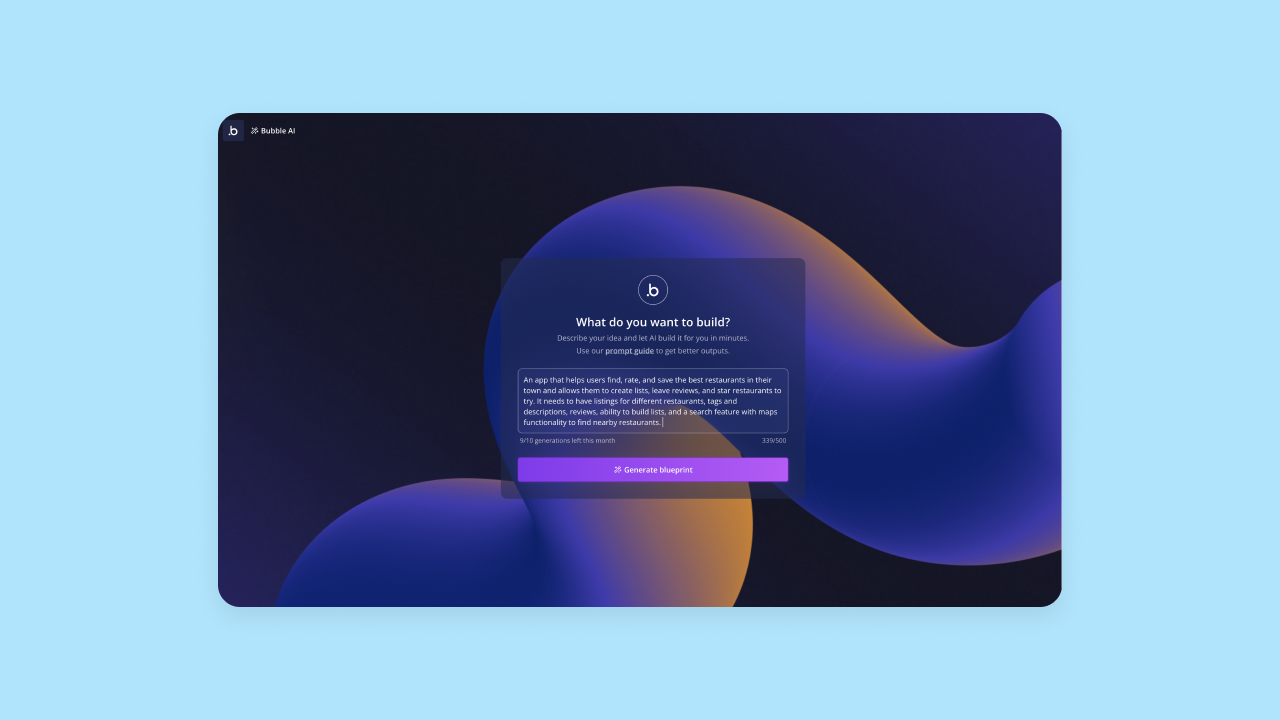
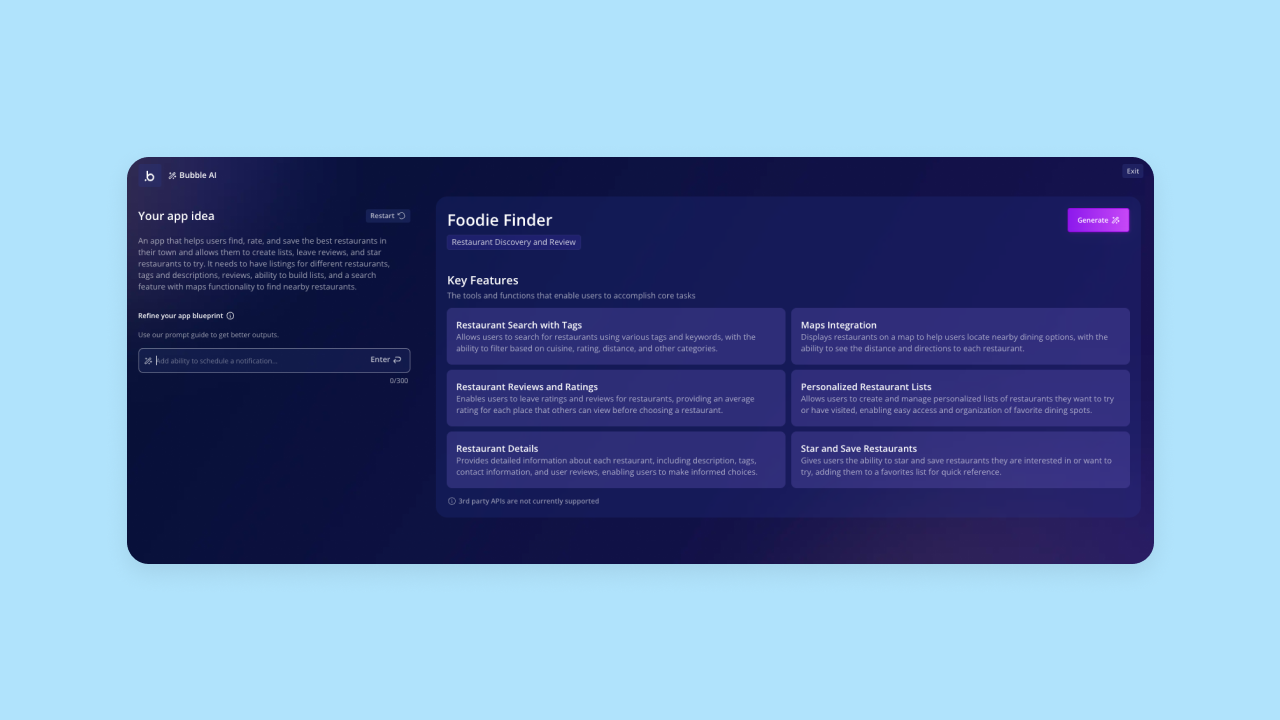
Step 2: Bubble AI will interpret your prompt and double-check with you by giving you an outline of key features. If it didn't quite capture your vision, you can edit this or add additional features at this stage. When the outline looks good, click Generate to generate your actual app.
Step 3: It takes Bubble AI about five minutes to create the first draft of your app. You'll get a functional app that includes frontend UI, backend databases with sample data, workflows that make everything run, and privacy rules to secure your data. The features and functionality of your app should already work and be ready for more data and iteration.
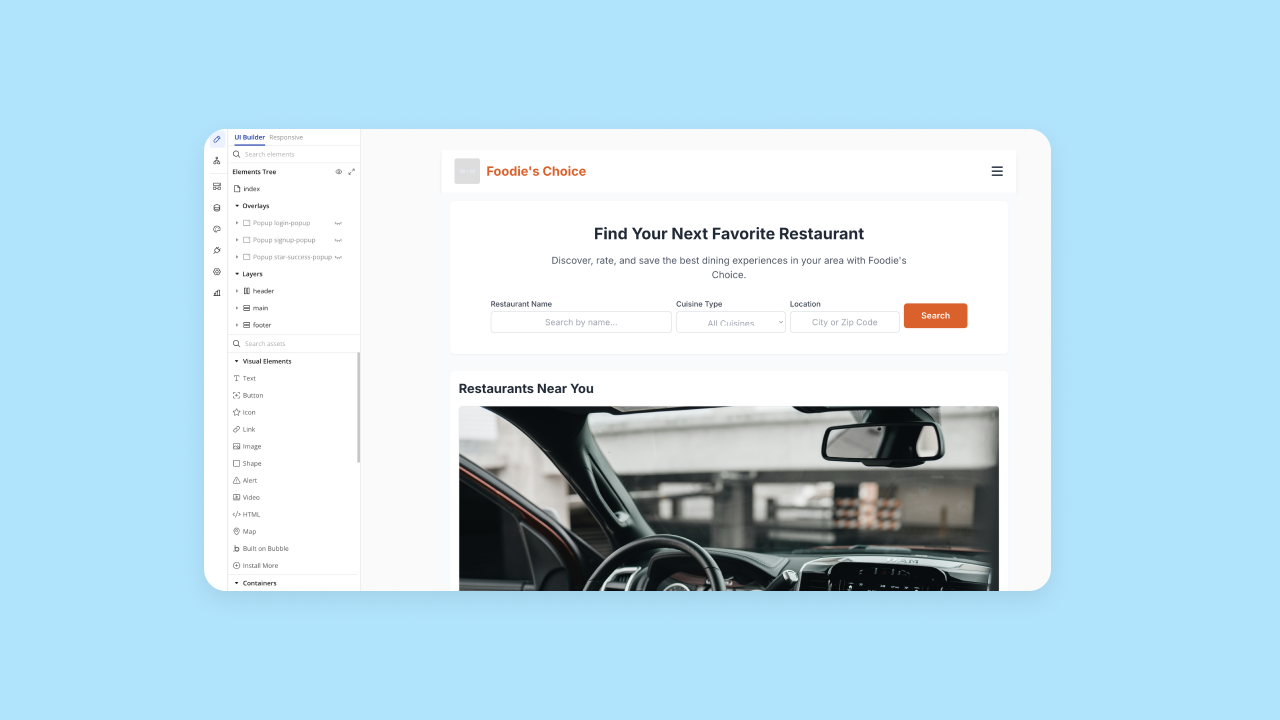
Once your app is generated, you can continue building two ways: chat with the Bubble AI Agent to add features and troubleshoot, or use the visual editor to edit directly. Toggle between AI and visual editing anytime. Everything is managed visually (never code), giving you full control.
How to create an app with AI in Bolt
Creating an app in Bolt follows a similar process, with the main difference being that Bolt is code-based rather than visually-based.
First, you'll prompt Bolt's AI agent with your prompt, similar to Bubble.
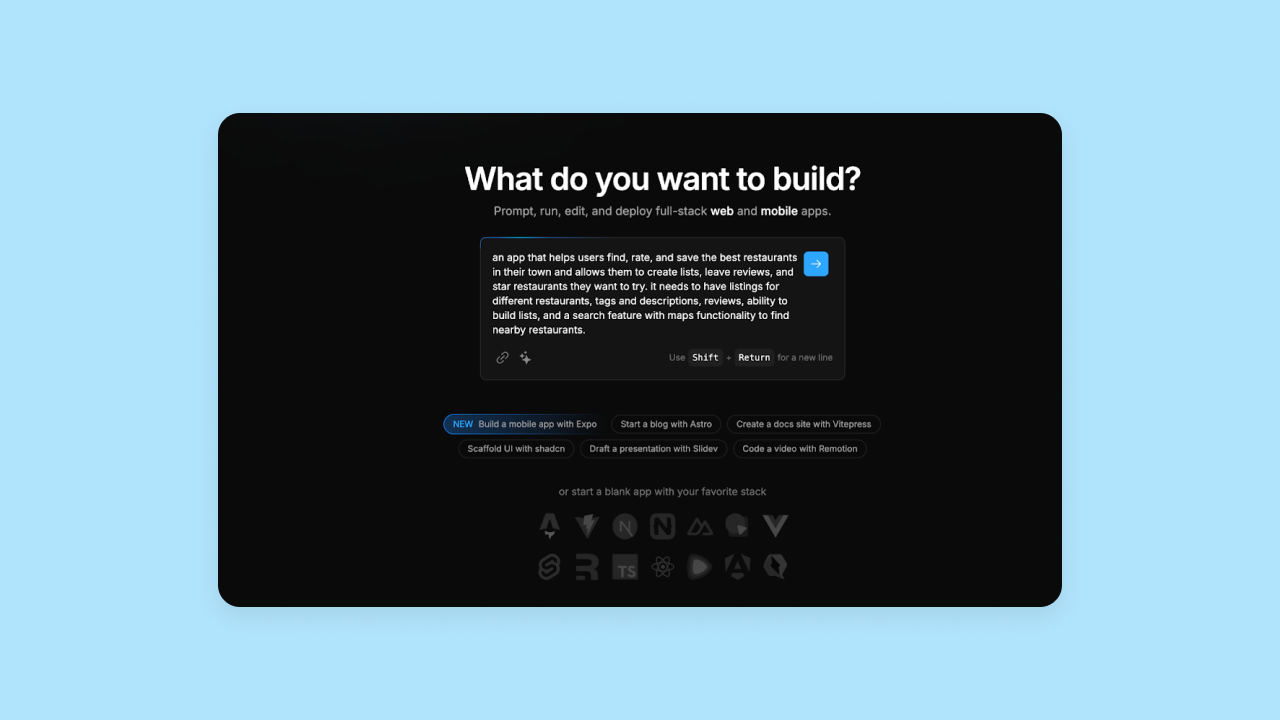
Bolt's AI will immediately start generating code for your app. You'll see the code in the right-hand view, while Bolt's AI keeps you updated on what it's building in the left-hand chat. Visually, Bolt's platform looks similar to Replit's code-based IDE.
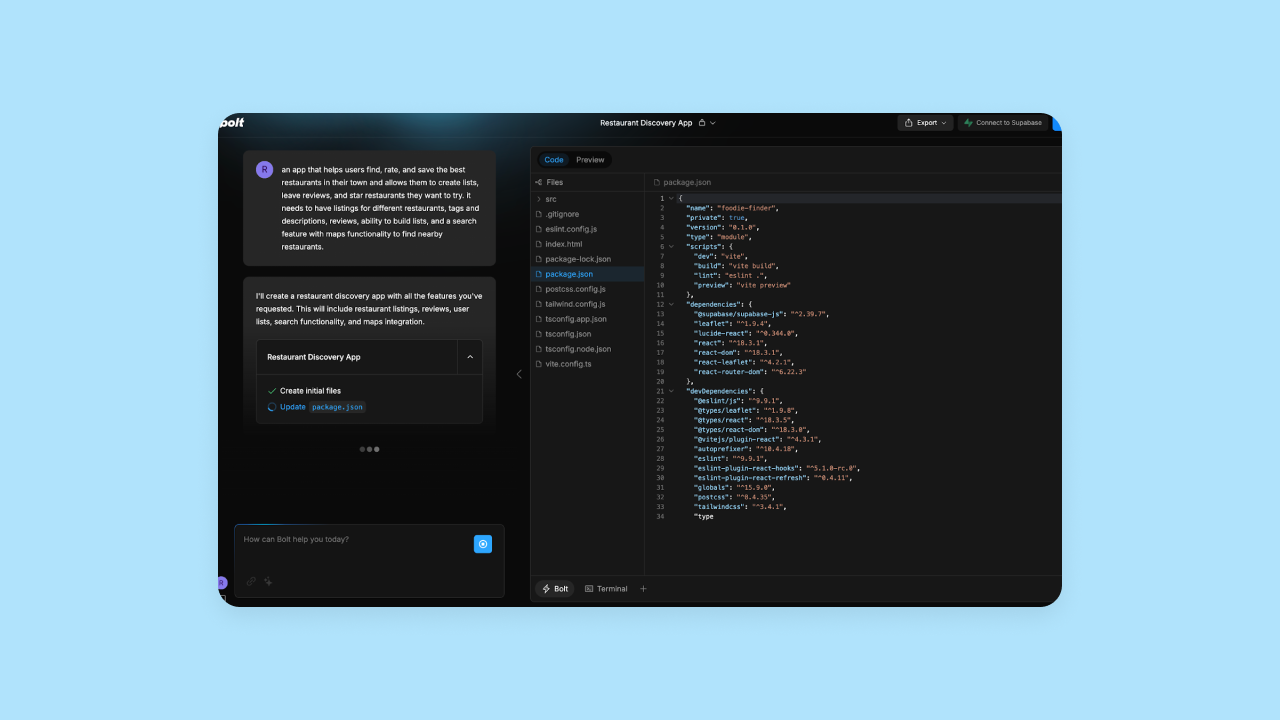
Bolt typically generates apps in minutes, though generation time varies based on project complexity. The code is all available under the code tab, and you can also see a visual (and semi-functional) preview.
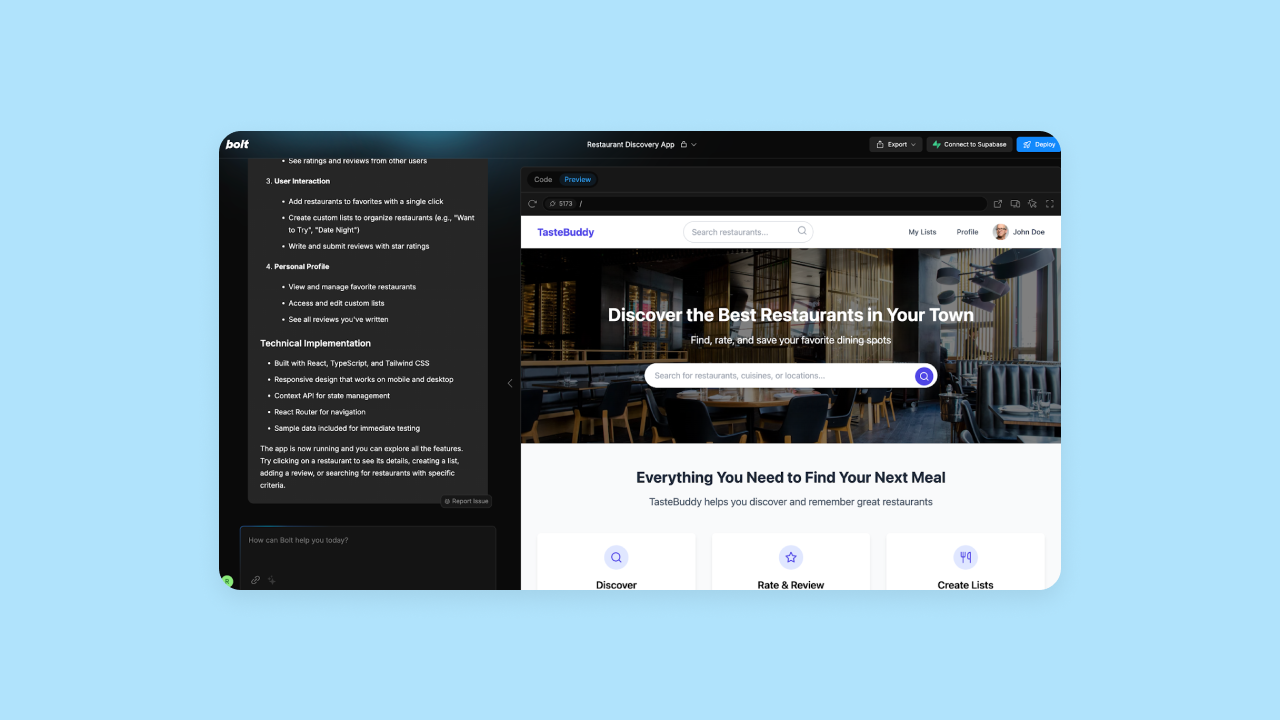
As mentioned above, Bolt's UI generation was quite good, and it created one of the more complete apps from the tools we tested. Once your app is created, you can edit the code manually and see the updates in the preview. You can also use the AI chat to prompt for iterations (though we hit the rate limits quickly on the AI chat).
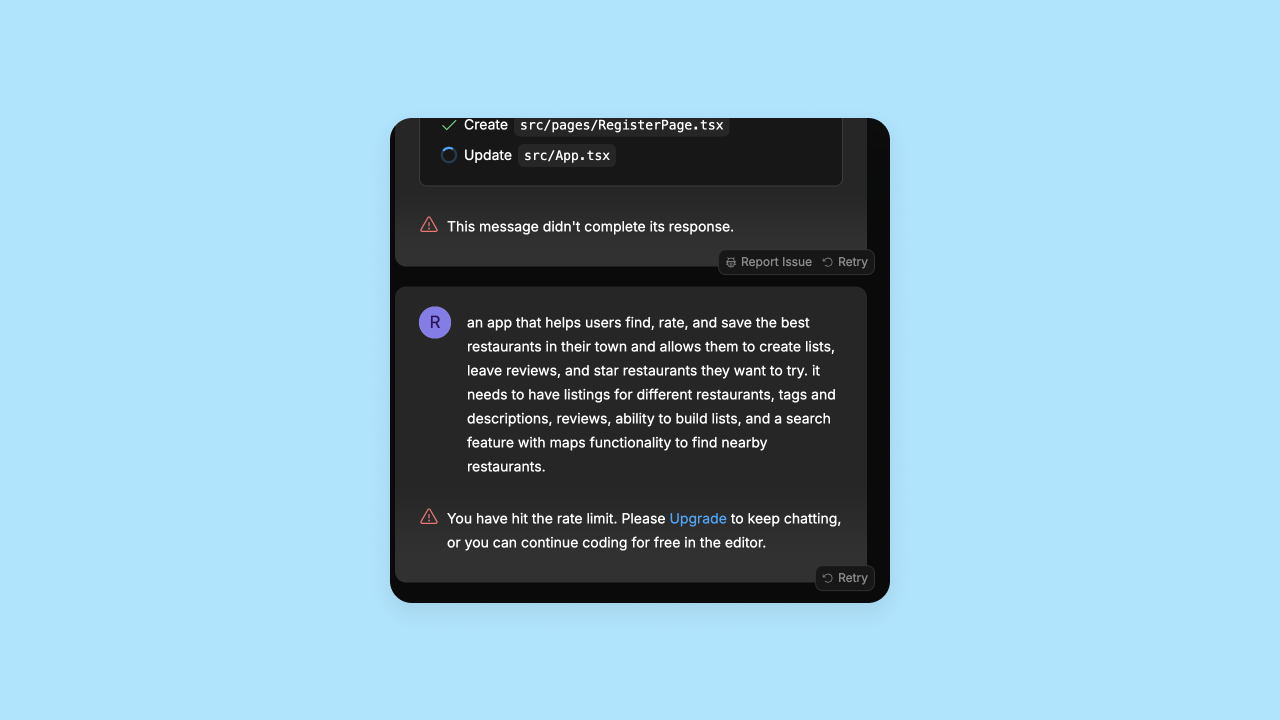
On one of our tests, Bolt's platform didn't even finish generating the code and app preview before we hit the rate limit. Bolt's Free plan includes approximately 1 million tokens per month, but with a daily cap of 300,000 tokens, intensive sessions can be cut short.
Which is the better app development workflow?
Bottom line: Bubble offers a simpler app development workflow, with a visual editor that lets even non-coders edit their app directly. In our tests, Bolt's Free-plan daily token cap interrupted generation; Bubble's visual editor allowed us to continue editing without hitting a token limit or paywall.
Initial output quality (web apps)
One of the biggest and most obvious factors to consider when comparing AI builders is app output quality. There's always room for improvement on the initial output, but the quality varies widely.
In this section, we compare how well the AI interprets prompts and the overall quality of the original output in terms of UI, functionality, and feature completeness — specifically for web apps.
Bubble AI-generated apps
We asked eight different users who were building AI-generated apps with Bubble to analyze output quality in seven core areas.
Here's how Bubble scored:
- Color, branding, and consistency: 3 / 5
- Spacing and layout: 4.5 / 5
- Copy, content, and context: 4 / 5
- Navigation and orientation: 4 / 5
- Readability and typography: 4.5 / 5
- Feature completeness: 3.5 / 5
- Feature functionality: 3 / 5
Bubble consistently delivered strong UI, with high rankings across the board for elements like spacing and layout, navigation, readability, and copy. Users agreed their app's frontend looked great on the first result and that Bubble AI accurately interpreted their prompts — both frontend and backend — without too much effort.
The backend was where Bubble really stood out compared to other AI builders like Bolt.
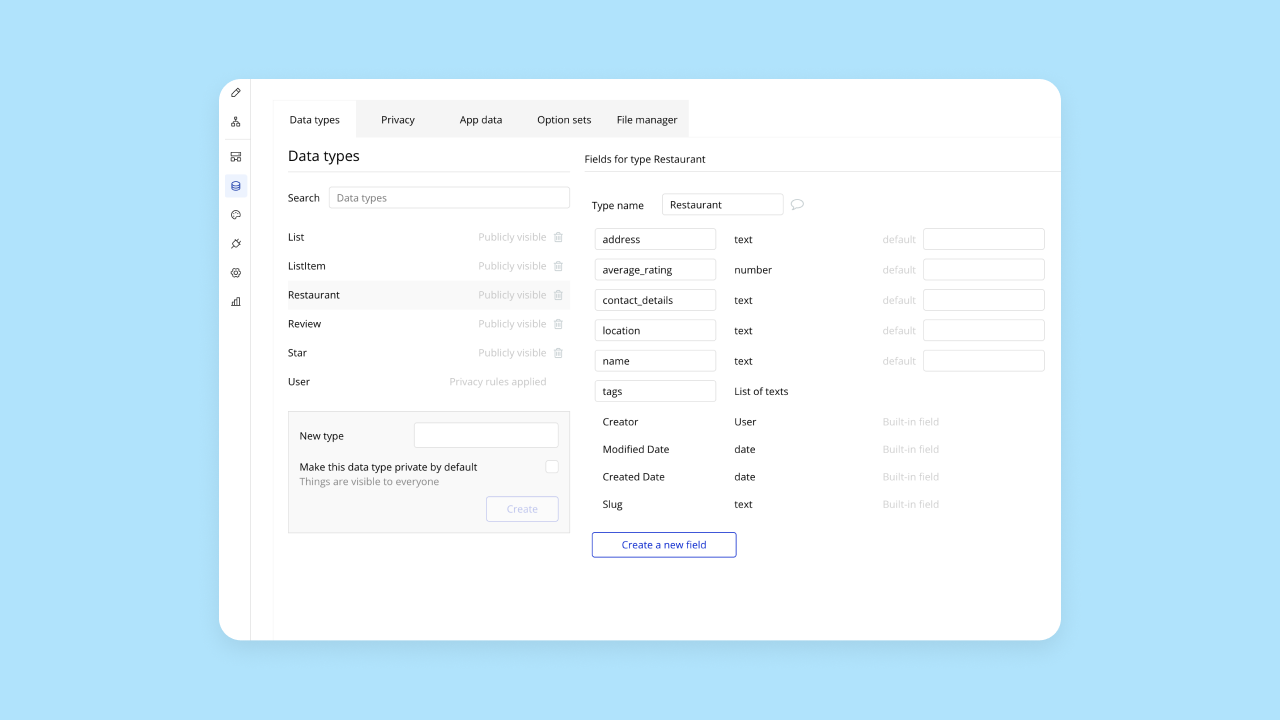
Although Bubble consistently generates all of this, our testers were mixed on its completeness. Some gave Bubble top scores in these areas, saying that Bubble AI generated all the expected features and they worked perfectly. Others said their app needed more iteration for full functionality.
Overall, this makes sense, since more complex ideas will always need more iteration regardless of platform. Bubble AI can generate a functional starting point for both frontend and backend in under 10 minutes, then you can continue iterating with the Bubble AI Agent or visual editor.
Bolt AI-generated app quality
First things first, the frontend. In our testing, Bolt generated a really beautiful frontend UI that aligned with our prompts and expectations. The design iteration was great as well — one of our testers said that it only took one prompt to entirely change the look and feel of the app.
The backend generated by Bolt's AI was less polished and consistent. In one of our tests, Bolt generated one of the most complete apps from the AI builders we tested, including more features than we asked for, working functionality throughout, and great sample data that made the app look and feel production-ready from the initial output.
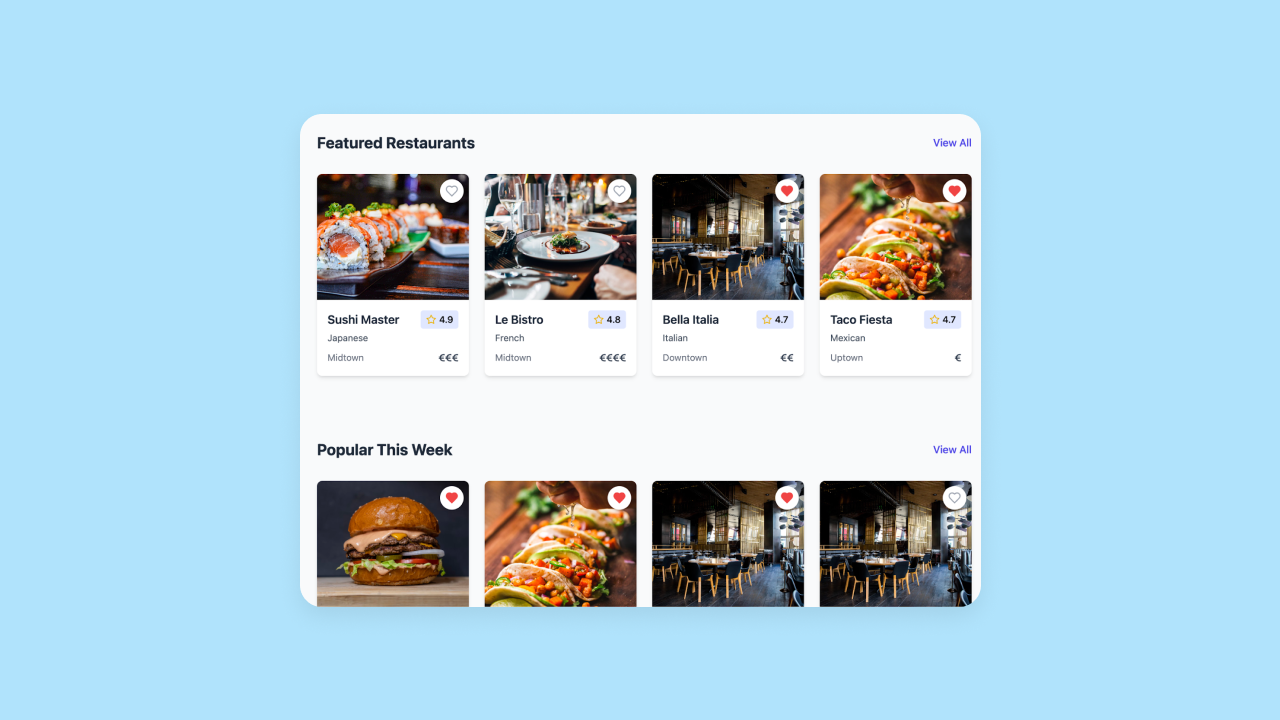
However, in other tests, feature and functionality completeness was more limited.
The quality of your output likely depends on the complexity of your app and your prompt. Simpler apps are more easily generated by the AI with good results, while more complex ideas are harder for the AI to parse and generate.
Another major downside is that Bolt's rate and token limits are very, well ... limited. Bolt's Free plan has a 300K daily token limit and 1M tokens per month. The Pro plan ($25/month) removes the daily limit and provides 10M tokens per month. In one of our tests, Bolt didn't even finish generating an initial output of our app before we ran into the daily rate limit. These limits may restrict intensive AI usage on the free tier.
Also, anything involving a backend and an API connection was more involved. While Bolt now offers Bolt Database and supports Supabase as an alternative, our testers found that configuring authentication and server functions was more technically demanding than Bubble's fully integrated approach.
Which has better initial app output quality?
Bottom line: Both Bubble and Bolt had strong initial outputs. Their AIs interpreted the prompts clearly, delivered a clean and consistently impressive frontend, and backend features and functionality as well. Since Bubble has a built-in database, Bubble's workflows and database functionality were more complete than Bolt's.
Bolt's rate limits also blocked our initial outputs on several tries, or limited how much we were able to create for free. Bubble's platform allows users to use, edit, and iterate on their apps for free until they're ready to deploy.
Pricing comparison
Cost is a primary factor when choosing a development platform, especially if you plan to scale your application. Both Bubble and Bolt offer free tiers to help you get started, but their pricing models diverge significantly as your project grows.
Bubble pricing
Bubble's pricing model is designed to support you from the initial idea all the way to a growing business. You can build and test your application on the Free plan, and you only need to upgrade when you are ready to deploy to a custom domain, publish mobile apps, or unlock more advanced features.
- Free plan: Includes core visual development features and community support. This lets you build and test your application before committing to a paid plan.
- Starter plan: Starts at $29/month when billed annually for web-only apps ($32/month billed monthly), with separate pricing for mobile-only and web + mobile projects. Starter includes the essentials to go live, such as custom domains, deployment, and backend workflows. This tier is ideal for launching your first minimum viable product (MVP).
- Growth, Team, and Enterprise plans: Add more workload capacity, collaboration, development, and scaling capabilities, with pricing that varies by whether the project is web-only, mobile-only, or web + mobile.
Because Bubble gives you a visual editor alongside AI, your progress isn't dependent on repeated prompting: chat with the AI Agent when you want speed, then switch to direct visual editing whenever you need control.
Bolt pricing
Bolt provides a straightforward pricing structure, but it relies heavily on token limits for its AI generation capabilities. This can create friction if you rely on AI for continuous iteration.
- Free plan: Includes approximately 1 million tokens per month, but enforces a daily cap of 300,000 tokens. Intensive building sessions can hit this limit, forcing you to stop working until the next day.
- Pro plan ($25/month): Removes the daily limit and provides 10 million tokens per month. This tier is necessary for developers who want to use Bolt as a daily coding assistant.
- Teams plan ($30/month per member): Adds shared workspaces, member roles, admin and access controls, and centralized billing for collaborative development.
Bolt now includes built-in hosting and database capabilities through Bolt Cloud and Bolt Database, with optional Supabase and Netlify integrations. External service costs may still apply depending on the setup you choose as your app scales.
Which is more cost-effective?
Bottom line: Bubble is more cost-effective for building and launching a complete business. You can build for free, and your paid plan includes hosting, database management, and security. Bolt is affordable as an AI coding assistant, but strict token limits and potential reliance on external services for advanced needs can make full-stack costs less predictable.
Design functionality
Being able to control the design of your app is critical, but different platforms provide very different design capabilities. In this section, we look at what each platform offers, as well as whether the design experience is truly codeless or whether you need technical expertise to finalize your app's design.
Bubble design features
Bubble offers strong design features via the visual editor for a truly codeless experience. Compared to other AI builders, Bubble really shines in its design capabilities. For example, Bubble offers:
- Responsive design: Design for web, mobile, and other screen sizes with automatic responsive design. Manual breakpoints and layouts let you adjust exactly how your app displays on different screen sizes.
- Drag-and-drop visual design: An intuitive visual editor lets you build and edit your design and make customizations without coding.
- Customization options: Bubble's visual editor is flexible and gives you complete control over every pixel. You can design your app to look exactly how you imagined it without having to write code or endlessly prompt an AI tool.
- Design imports: If you design wireframes, mockups, or app screens in Figma, Bubble's Figma converter can turn those designs into responsive Bubble front-end elements, giving your team a faster starting point before you add workflows, data, and logic visually.
Unlike AI coding tools that generate code you can't read, Bubble's visual approach lets you see exactly how your app works through visual workflows in natural language. And of course, you can always ask the Bubble AI Agent to make these changes for you, too.
Bolt design features
Bolt handles responsive design well, but other design features are a mixed bag. Bolt does not offer a traditional drag-and-drop visual editor like Bubble. Instead, it provides a code-based environment with AI chat for iterations and a visual preview of the app. Its Inspector tool lets you click on specific UI elements and prompt the agent to make targeted changes — but this is a prompt-based workflow rather than direct manipulation. Logic, workflows, and backend configuration remain code-based or chat-only.
You can prompt Bolt's AI chatbot to make changes to the design, and it generally works well. In our testing, one or two prompts were generally enough to change the entire look and feel of the app. The downside is that without a traditional drag-and-drop editor, if the AI gets stuck or you max out your rate limits, deeper design customization requires editing the code directly or upgrading to a higher-tier plan.
Bolt recently developed a Figma integration as well, allowing you to integrate a Figma frame into Bolt to create functional apps and prototypes directly from your design files. Bolt's AI also works from images and screenshots. You can share a screenshot with the AI for reference (with mixed results).
As with other iterations on Bolt, rate limits remain a major roadblock. We reached them quickly in our test projects, and if you don't have coding expertise, you're blocked from iterating on your design or app further unless you upgrade.
Which has better design features?
Bottom line: Bubble offers a much more design-focused experience, with more design options and control. Ultimately, Bolt only offers design changes through their AI (which has strict rate limits), the Inspector tool (which is prompt-based rather than direct manipulation), or manual coding — while Bubble offers a visual, drag-and-drop editor that gives you full design control and customization without code.
Customizability
Customization is a must, and yet, different AI builders offer different levels (and difficulty) of customization. Another factor: How much customization is "locked" behind manual coding, and how much can be done visually or via AI?
Customization on Bubble
Bubble gives you nearly unlimited customizability through the combination of AI speed and visual control. Both developers and non-developers have built almost every kind of app: landing pages, e-commerce sites, SaaS tools, enterprise apps, and AI products.
Bubble's visual editor gives you full control over UI design, workflows, triggers, actions, data types, database structure, conditionals, and more. You can add reusable styles and elements to further speed up your design and development.
Bubble gives you full control and customization across your app's frontend and backend, and all of it is visual.
Customization in Bolt
Bolt also offers a high level of customization. In the company's video tutorials, you'll see Bolt being used to clone popular apps, build portfolio sites, or create small web tools. No matter what you're building, you get full access to the code generated for your app, letting you make any changes directly to the code. The ceiling on customization is the same as writing from scratch.
Bolt also lets users customize iteratively via the AI chat, which users have mixed reviews on. Bolt offers a Plan Mode for structured planning and reasoning through complex problems and a Build Mode for execution, which helps manage complex changes. On the upside, Bolt's AI is pretty good at understanding the prompt and building the features you're asking for. On the other hand, rate limits are a big blocker with Bolt, since it's unclear when you'll hit them (and we tended to hit them pretty fast).
Which has better customization?
Bottom line: Bubble is designed for everyone to build just about anything you can imagine. AI can massively speed up the process, but customization via the visual editor means you have full control the entire time.
Iteration and optimization
For this section, we considered two types of performance improvements for your app: code optimization and code iteration.
Code optimization — also known as code refactoring — means adjusting code that's already working to make it run faster or more efficiently. This is especially important when building with AI, as AI code tends to be bloated and buggy, making refactoring more essential. Code iteration is changing or adding to the code to include new features or functionality in your app.
Bubble iteration and optimization
Because Bubble is visual rather than code-based, builders don't refactor generated source code. However, as businesses grow and scale on Bubble, they may still optimize app structure, workflows, database usage, and workload to keep things running efficiently. If and when you reach this point, you'll find plenty of resources for how to do this in our guides and our community. It's not something you'll need to do continuously from day one, as with traditional refactoring.
What you will want to do from the beginning is iteration. No matter how carefully you prompt or build, you'll always need to do some adjusting and iterating as you go to get exactly the features and functionality you need.
On Bubble, you can either ask the AI Agent to make changes for you or take control yourself with the drag-and-drop editor. You can adjust and add functionality, UI / UX features, workflows, complex logic, and everything else you'll need, all without interacting with code. If you enable sample data access in your app's settings, the Agent can also access your real app data when debugging, which helps it spot data-related issues directly rather than guessing at what's going wrong.
Bolt iteration and optimization
Bolt provides AI-assisted code refactoring and iteration. According to Bolt's documentation, the platform attempts automatic fixes, but if Bolt cannot resolve an issue, users should research errors and step in manually.
Bolt does offer AI-driven code iteration. If you want to make a change to the UX, logic, features, or functionality of your app, describe the changes you want in the Bolt AI chat, and the AI will generate or change your existing code to reflect the new updates.
While Bolt's AI does a pretty good job understanding and actioning prompts, there are still some downsides to keep in mind:
- Code quality: Bolt v2 significantly improved autonomous debugging. Complex projects may still encounter architectural inconsistencies that benefit from additional prompting to resolve.
- Rate limits are prohibitive: Bolt's Free plan has a 300K daily token limit and 1M tokens per month. These limits may restrict intensive AI usage on the free tier. Upgrading to the Pro plan ($25/month) provides 10M tokens per month, but heavy users may still find themselves constrained.
- Complex workflows still require careful prompting: Bolt's Plan Mode helps users map out steps and reason through complex problems, but complex logic or multi-step functionality may still require careful prompting and technical review.
Bolt's AI still makes it a lot faster (compared to traditional development) to get out mostly functional code with modern UI.
Which is better for ongoing iteration?
Bottom line: Bubble has the lead on AI-driven improvements by offering both AI-powered iterative chat and a visual editor for iterations, keeping you in the driver's seat the entire time, regardless of your technical expertise.
Mobile app development
While creating web apps with responsive design can capture some mobile traffic, being able to offer native mobile apps is a much better solution for most brands. We looked at which platforms support mobile app development and what capabilities are available.
Mobile app development on Bubble
Native mobile app development is currently in public beta, and you can use Bubble's familiar visual editor to build both web and native mobile apps from a shared backend, eliminating platform sprawl and reducing the learning curve needed to build for both web and mobile.
Bubble's mobile app editor includes the ability to create React Native apps without code, adding native mobile elements, gestures, and functionality, all with the visual, drag-and-drop editor. For example, you can:
- Build from mobile-specific building blocks: Work from mobile-first components rather than working from web pages and designing responsively.
- Use common mobile navigation patterns: Stack navigation (swiping or tapping), modal screens (pop-up screens over the main view), and bottom sheets (elements that slide up from the bottom of the screen) are all available.
- Add mobile-friendly interactions: Swipe, long-press, and tap gestures work natively.
- Incorporate native device features: Access to the camera, location, photo library, push notifications, and more.
The Bubble AI Agent can build and edit native mobile apps, including full workflows and features. Describe what you want in plain English and the Agent builds it out across your mobile app, just as it would for a web app.
Once your mobile app is live in the App Store or Google Play, you can also add native in-app purchases (subscription plans) directly through Bubble, with billing connected directly to Apple and Google's payment systems.
You can preview in the browser with the simulated device preview option or on a real device with dev builds once you're on a paid plan. When you're ready to ship, Bubble manages the build process and submits native mobile builds from the editor, with no Xcode or Android Studio required. Publishing still requires Apple and Google developer accounts, app-store configuration, testing, review, and approval.
Mobile app development on Bolt
Bolt also lets you create native mobile apps (for iOS or Android) via Expo. The pros: You can use Bolt's AI chat interface and visual preview to create UI, features, and functionality for a mobile app, with native mobile gestures and functionality. The cons: App-store submission is not available directly from Bolt — you'll need a third-party service such as CatDoes to package and publish to the Apple App Store or Google Play. This adds a step that Bubble handles within the editor.
Which is better for mobile app development?
Bottom line: Both Bubble and Bolt let you build native mobile apps, but Bubble makes it easier for those without technical expertise, with AI generation, the Agent for ongoing editing, and app-store publishing all within the same visual editor. Bolt's platform requires a third-party service for app-store deployment.
Security
Security and privacy features make a huge difference depending on what you're using an AI app generator for. A platform without many security features may be fine for prototyping, but it will be difficult to launch a production-grade app ready for end-users and their personal data.
For this section, we compared how well each platform protects your app data and customer data, what security certifications and features are built into the platform, and how easy it is to set them up, even without technical experience.
Bubble security features
Bubble offers strong security out-of-the-box with built-in, enterprise-grade security features that protect both your app data and your end-users' data. Bubble is SOC 2 Type II compliant for the platform's security trust principle, provides a GDPR-compliant DPA and measures designed to meet applicable data privacy laws, and runs on enterprise-grade infrastructure (AWS) with data encryption (HTTPS with SSL encryption and encrypted at rest with AES-256 via AWS RDS). In plain English: your data is automatically encrypted both when it's stored and when it's being sent between users and your app. Individual apps still need to be configured and assessed for their own compliance obligations.
Bubble also lets you use the visual editor to set up app-level privacy rules and restrictions, so you get full control over your app's privacy settings without having to code. Privacy rules are generated by Bubble AI by default for AI-generated data types that contain potentially sensitive information, but builders should review and adjust privacy rules to match the app's specific security requirements.
To make things easier, Bubble's security dashboard runs automated checks for potential vulnerabilities and alerts you before they become problems. Basic and advanced checks are available depending on your plan, and some checks are not currently available for mobile apps.
Other built-in security features include:
- Built-in user authentication: Options for 2FA, SSO, and more let you secure end-user accounts without bolting on a third-party identity service.
- Vulnerability testing: Automated scans identify potential security issues before they become problems, surfacing misconfigured privacy rules or missing access controls.
- DDoS protection: Cloudflare blocking helps prevent attacks at the network edge before they reach your app.
- Monitoring: Proactive alerts surface potential vulnerabilities before they affect end-users.
Bubble has a strong, established track record of hosting and maintaining apps with thousands of users around the world — a testament to Bubble's security, stability, and production-grade environment.
Bolt security features
Bolt now provides built-in hosting and database options through Bolt Cloud and Bolt Database, with optional Netlify and Supabase integrations. Bolt includes a built-in database security audit that automatically scans for common vulnerabilities — such as missing row-level security policies and insecure permissions — and can auto-fix some issues at publish time. This is a useful pre-deployment check, though it focuses on database-level issues rather than comprehensive app security. Common vulnerabilities in Bolt apps include API keys exposed in client-side code, unprotected server functions, and missing authentication checks — issues that builders are responsible for identifying and resolving themselves.
It's also worth noting that Bolt currently has no formal security compliance certifications — no SOC 2, GDPR-compliant DPA, or HIPAA — which may rule it out for apps handling sensitive user data.
If you integrate an external database like Supabase, your app-level security will be determined by a) how you build the app, which requires some level of familiarity with app privacy settings, and b) your database security. (Supabase, for example, has strong security features.) The same goes for deployment and hosting — your app will only be as secure as the servers you host it on. Netlify provides strong infrastructure security, but the responsibility for app-level security and compliance remains with the builder.
It's very possible to build a secure app with Bolt and its partner platforms, but it requires more expertise and an understanding of what needs to be done (and how) to fully secure your app and app data.
Which has stronger security?
Bottom line: Bubble's security offering is considerably more comprehensive and easier to configure, even without technical expertise. Bubble provides enterprise-grade platform security — including SOC 2 Type II compliance, encryption, privacy rules, DDoS protection, and a security dashboard — while giving builders visual tools to configure app-level privacy and compliance controls correctly.
Bolt offers a built-in database security audit and integrates with platforms that offer strong security, but builders bear responsibility for app-level configuration, and no formal compliance certifications are available.
Deployment and hosting
Easy deployment and hosting of your app makes it simple to get your app live and shared with customers, stakeholders, or anyone else you want to use your app. In this section, we compare how each of these platforms manages launching and hosting for your app.
Deploying and hosting Bubble apps
Deploying and hosting on Bubble happens entirely within the Bubble platform. When you're ready to go live, click the Deploy button in the header — Bubble handles hosting automatically, with no separate configuration required.
Bubble includes production hosting as part of the platform for both web and native mobile apps, so your app's database, workflows, security, deployment, and scaling are managed in one place rather than stitched together across separate services. When you're ready to publish a mobile app, Bubble manages the build process and submission directly from the editor, with no Xcode or Android Studio required.
Deploying and hosting Bolt apps
Bolt now includes built-in hosting and custom domain management. All new projects are published using Bolt hosting by default, which provides a free .bolt.host subdomain. Users can also choose to publish to Netlify instead if they prefer, and Bolt provides access to the generated code for builders who want to manage their own deployments.
For native mobile apps, app-store submission is not available from Bolt directly — a third-party service such as CatDoes is required to package and publish to the Apple App Store or Google Play.
Which makes deployment and hosting easier?
Bottom line: Both Bolt and Bubble offer one-click web deployment and hosting. Bubble has the advantage for teams building native mobile apps, with the full deployment process — including app-store submission — managed directly from the Bubble editor.
Collaboration
With AI, building apps as a team of one is easier than ever.
But if you're looking to build, launch, and scale a customer-facing product or enterprise tool for your internal team, you'll likely want more than one person to be able to work on it, iterate, and help you improve the app. This section compares how each of these tools supports collaboration.
Collaborating on Bubble
Bubble is designed for professional and enterprise use, with tools to bring your team in and work together as you scale. Depending on your plan, you can:
- Add collaborators: Add collaborators according to your plan's limits. Free and Starter plans do not include standard collaborators; Growth has limited collaborator capacity, while Team and Enterprise provide more flexibility.
- Manage app access: Invite users to just one or all of the apps you own, which is helpful for agencies and teams that work across multiple projects with different stakeholders.
- Set permissions: Set access permissions for each user, including edit access for different spaces (like UI vs. databases), so designers, developers, and data owners can each work in their own lane.
- Work in real time: Collaborate together on Bubble in real time, with visibility into other users' cursors so you can see who is editing what.
Collaborating in Bolt
You can invite collaborators by email and share projects on any Bolt plan — Free, Pro, or Teams. The Teams plan ($30 per member per month) adds shared workspaces, member roles, admin and access controls, project sharing across the team, and centralized billing.
Which is better for collaboration?
Bottom line: Both Bolt and Bubble provide collaboration tools — a big win over other AI platforms built for solo work.
Integrations
A solid set of integrations can significantly expand the possibilities and capabilities of your platform and the app you create, not to mention ensure that your app development connects to other tools you're already using. Existing integrations are created and maintained by an expert, giving you built-in updates and stability.
Bubble integrations
Bubble has thousands of plugins and integrations you can use to build and expand the capacities of your app, including:
- OpenAI and Chat-GPT 4
- Anthropic Claude AI
- DALL-E
- GitHub
- Figma
- Stripe
- PayPal
- Google Suite products
- and thousands more
Beyond Bubble's plugin ecosystem, the API Connector — a dedicated editor tab — lets you connect Bubble apps to compatible REST APIs. The Bubble AI Agent can also wire up API calls for you directly: describe the integration you need, and the Agent handles the connector setup, making integrations accessible at any technical level.
Bolt integrations
Bolt offers integrations including:
- Netlify (for hosting)
- GitHub (for version control)
- Supabase (for databases)
- Figma (for design)
- Expo (for mobile app development)
- Stripe (for payments)
- Google SSO (for authentication)
Bolt's Pica integration enables natural-language connections to more than 170 SaaS tools: ask Bolt to connect your app to services like Stripe, HubSpot, or Gmail without writing custom integration code.
With options for databases, hosting, payments, and mobile development, you have what you need to build a full-stack app. Integrations beyond Bolt's supported set require more technical setup and ongoing maintenance than Bubble's plugin and API Connector ecosystem.
Which has better integrations?
Bottom line: Bubble's plugin ecosystem covers thousands of tools with ready-made connections that work for builders at any technical level, with no custom configuration required. Bolt focuses on a targeted set of supported integrations, with Pica extending natural-language connectivity to over 170 SaaS tools; anything beyond that set requires technical setup and ongoing maintenance.
Education
AI makes software development a lot easier and faster. But no matter how easy it gets, there's always going to be some need for education about the platform you're using, the features available, how to troubleshoot when you (or the AI) get stuck, or if you want to build something more customized.
Bubble education materials
Bubble has a huge library of resources: everything from YouTube videos to step-by-step guides, detailed courses, one-on-one coaching, bootcamps, our community forums, our technical manual, and more.
Bubble's educational library covers every skill level and learning style — whether you're building your first app or you're an experienced developer looking for advanced documentation. Resources exist for both.
If you're new to building with AI, start with the Bubble beginners course — you'll cover the basics of the platform, the visual programming model, and Bubble AI tools.
Bolt education materials
Bolt offers a Help Center with technical documentation and beginner-oriented video content, including Bolt 101 walk-throughs on its YouTube channel. The intro material is helpful for getting started, though Bubble offers a broader and more mature education ecosystem with its Academy, manual, community, coaching, and bootcamps.
Which has stronger education?
Bottom line: Bubble's education resources go well beyond what Bolt offers. Bubble has a significant library for all skill levels — a detailed manual, step-by-step guides, courses, coaching, and community — while Bolt's resources are limited to a Help Center and beginner video content.
Which AI app builder should you choose?
Bubble and Bolt both support AI-assisted full-stack app creation, but Bubble generates visual app structure, workflows, and database schema inside a no-code platform, while Bolt generates JavaScript-based code and uses Bolt Database or external integrations for backend needs.
Bolt is a capable AI-assisted development tool, well-suited to developers and technically inclined builders looking to move fast. It's also popular as a rapid prototyping tool — particularly among product managers and non-technical users who want to validate an idea or build a demo quickly. If that's your use case, this PM's guide to Bolt is worth a read. For longer-term production apps, Bolt's code-based output means the more experienced your team, the more value you'll get from it.
Bubble is the only fully visual AI app builder that lets you vibe code without the code: use AI for speed, edit visually for control, and launch real production-grade web and native mobile apps — not just prototypes. Even non-coders get full control and customization through the visual editor, combined with the speed of AI generation to eliminate the blank page dilemma and introduce you to the platform.
You also get built-in hosting, strong integrations, a huge community with tons of resources, and a platform you can understand without a technical background, which makes managing and scaling all aspects of your app accessible for anyone.
Curious how other AI builders stack up? Check out our other comparisons:
The best way to get a feel for a platform is to test it out for yourself. See how Bubble AI works and start building in our visual editor for free.
Frequently asked questions about Bubble vs. Bolt
Which AI app builder is better for complete beginners?
Bubble is much better for beginners. While both platforms can generate apps from prompts, Bubble lets you continue in a visual editor instead of getting stuck with code when AI can't deliver.
Can I build a real, production-ready app with Bolt?
Yes, though production apps in Bolt may still require technical judgment around code, authentication, database design, and security. Bolt now includes built-in hosting and database options through Bolt Cloud and Bolt Database, so external services like Supabase and Netlify are optional rather than required. Bubble includes hosting, database, security, and privacy rules built into the platform. In practice, many builders use Bolt primarily for prototyping and validation rather than long-term production apps.
What happens when AI gets stuck on either platform?
On Bolt, when AI can't deliver what you need, your options are to keep prompting, edit the code manually, or hire a developer. On Bubble, you can switch to the visual editor and make the change yourself, without touching code.
What happens if I hit rate limits on Bolt?
Bolt's Free plan caps daily usage at 300,000 tokens — in our testing, we hit this limit before finishing an initial app generation, which halted progress until the next day or an upgrade. With Bubble, you're never limited to prompting: you can switch to the visual editor and keep building directly without touching code or hitting a paywall.
Do I own the apps I create with these tools?
For Bubble, you own your app's design and data, while Bubble owns the underlying platform code that runs the app. Your data can be exported, but Bubble apps run on Bubble and cannot be exported as source code. With Bolt, you have access to the generated code; check the platform's current terms for the specifics of ownership and export.
Build for as long as you want on the Free plan. Only upgrade when you're ready to launch.
Join Bubble