TL;DR: Approval workflow software routes each request to the right approvers and records every decision, so teams can retire email and spreadsheet approvals. Packaged approvals apps suit standard processes, while app builders suit approvals that depend on custom data and routing.
Approval requests tend to scatter. An invoice sits in one person’s inbox while a purchase request waits in a Slack thread, and nobody can say where either one is stuck. At audit time, someone digs through old emails to prove who signed off.
Approval workflow software moves every request through a set path and keeps a record attached. In Ardent Partners’ 2026 accounts payable benchmarks, top-performing teams approve an invoice in 4.1 days, while all other teams take 15.4.
You’ll learn what approval workflow software is and which features matter, then compare seven tools across four types, including packaged approvals apps and app builders. You’ll also get a decision checklist and a five-step rollout plan.
What is approval workflow software?
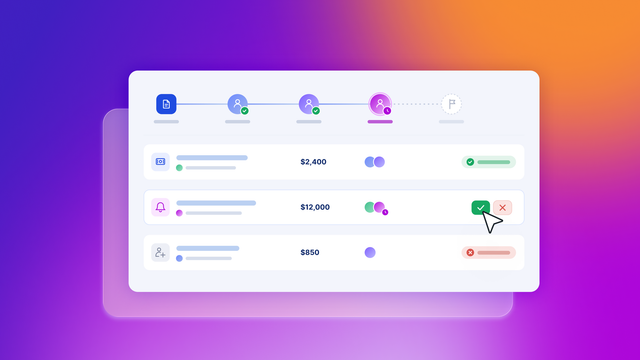
Approval workflow software automatically sends each request to the right people for sign-off in the right order. It handles anything that needs a yes, like expenses, invoices, content, or system access. It also reminds approvers when a request stalls and keeps a record of every decision.
You’ll also see it called workflow approval software or approval management software. Most tools follow six steps: submit, route, review, approve or reject, notify, and archive. Three terms come up often:
- Routing: The rules that decide who reviews a request next. A large purchase might also go to finance.
- Escalation: What happens when an approver doesn’t respond in time. After a set deadline, the request moves to a backup approver.
- Audit trail: A time-stamped log of who did what on each request. Auditors use it to confirm that the right people signed off.
Project management tools track tasks and deadlines, while approval software tracks who has to say yes and in what order. If you’d rather build your own approval tool, the Bubble Manual explains how Bubble workflows work and how these steps become app logic.
Why manual approvals break down as you grow
Email and spreadsheets work at low volume. As requests grow, four problems show up:
- Bottlenecks: One busy approver can hold up every request behind them. Without reminders, a request can sit for days unnoticed.
- No visibility: Requesters can’t see where a request stands, so they send follow-ups. Managers can’t tell which step is slow.
- No audit trail: Approvals spread across inboxes are hard to reconstruct. Proving who approved a payment can mean searching old threads.
- Single-inbox dependence: One approver’s vacation can stop the whole process. Approval routing software assigns backups so work keeps moving.
Automating can bring your process costs down. According to APQC benchmarks, top performers spend about $0.38 per $1,000 in revenue to process accounts payable, while bottom performers spend about $0.92. Automation is part of how they get there, along with good policies and controls.
Auditors also expect a paper trail. According to the GAO internal control standards, “Documentation is required for the effective design, implementation, and operating effectiveness of an entity’s internal control system.” The standard is written for US federal agencies, but the same logic holds for any team that gets audited.
Key features to look for in approval workflow software
Look for these features when you compare tools:
- Conditional routing: Requests go to the right reviewer based on details like the fee amount or the requester’s department, through several levels of sign-off or to several people at once.
- Reminders and escalation: The tool nudges anyone who hasn’t responded, then hands the request to a backup if the deadline passes.
- Audit trail: Every action is logged with a name and a time stamp, and you can export the full history when auditors ask.
- Role-based permissions: People see only the requests and fields their role allows, so requesters can track their own expenses without seeing anyone else’s.
- Integrations: Connections to ERP, CRM, Slack, or Microsoft 365 keep data in sync, and an approved invoice can post to accounting without retyping.
- Mobile approvals: Managers in the field can sign off from a phone or straight from an email.
- AI assistance: Some tools draft forms or summarize requests, while people still make the final call. It’s worth testing in demos, since nearly nine in ten respondents to the McKinsey State of AI 2026 survey report regular AI use in at least one business function.
- Compliance controls: Ask for a SOC 2 Type II report (an independent audit of the vendor’s security controls) and single sign-on (SSO) to speed up your security team’s review.
- Visible routing logic: If you can see and change the routing rules yourself, a policy change doesn’t need a vendor ticket.
For contracts and files, document approval workflow software usually adds version history and e-signatures.
Types of approval workflow software
Approval management software comes in four broad types, each with different trade-offs.
| Type | Examples | Setup speed | Flexibility | Governance |
|---|---|---|---|---|
| Packaged approvals apps | Kissflow, Pipefy, Jotform | Fast, with templates | Medium, within the vendor's setup | Built-in roles and logs |
| Work management platforms | monday.com | Fast for existing users | Medium, inside boards | Varies by plan |
| Ecosystem automation suites | Microsoft Power Automate | Fast inside Microsoft 365 | High inside the ecosystem | Microsoft admin controls |
| App builders | Bubble, Softr | Slower; you design the app | High; you define data and routing | You set up roles yourself |
With the first three types, the vendor has already decided how approvals work, and you adjust the settings to fit. With an app builder, you design the app yourself. That takes longer, but your routing can follow your own data.
The 7 best approval workflow software tools in 2026
We chose these seven tools for teams replacing email and spreadsheet approvals. Each one suits a different kind of approval process, so start with the tools that match how your team works.
Bubble is on the list for approvals that don’t fit a template, like a purchase request that checks a project’s remaining budget before it routes.
1. Kissflow: Best for packaged, low-setup approval apps
Kissflow is a low-code platform for building workflows and business apps. Requests can pass through several levels of sign-off, each person sees only what their role allows, and you can track every request as it moves. Prebuilt connectors plug it into the enterprise systems larger companies already use.
Best for:
- Larger organizations: Admins get a central governance hub with visibility across apps and users.
- Standard requests: Purchase and travel requests can start from ready-made templates.
Limitations: Kissflow is less flexible when approvals depend on custom data models. Quote-based pricing also makes costs harder to compare.
Pricing: Kissflow’s pricing page is quote-based, though Kissflow’s 2026 pricing guide puts the Basic plan at $2,500/month.
2. Microsoft Power Automate: Best for Microsoft 365 organizations
Power Automate is Microsoft’s tool for connecting apps and running tasks between them, including sign-offs on vacation requests and invoices. Reviewers can respond from an Outlook email, a Teams adaptive card (an interactive message inside Teams), or the Power Automate action center.
Best for:
- Microsoft 365 organizations: Requests show up in Outlook and Teams, where your team already works.
- SharePoint-based processes: Adding a vacation request to a SharePoint list can kick off a step-by-step sign-off chain.
Limitations: Power Automate works best inside the Microsoft ecosystem. Premium connectors need a Power Automate Premium or Process license, and complex flows get hard to follow.
Pricing: Power Automate Premium starts at $15 per user/month, paid yearly, with a 30-day free trial.
3. Bubble: Best for building a custom approval app you can see and change
Bubble is the fully visual app builder where anyone can build software, understand every part of it, and control every detail without code. Use it when your approval rules depend on your own data: Purchases above a department’s limit go to the CFO, and contracts with high-risk vendors go to legal.
You describe the approval process to the Bubble AI Agent, which starts with a planning session and then generates the pages, database, and workflows. Workflows are your app’s logic, written as plain-language steps like “when a request is over the limit, send it to finance.” You refine any step in the visual editor or by asking the Agent.
Backend workflows run on a schedule, even when nobody has the app open, to send reminders and escalate stalled requests. Privacy rules decide who sees which requests, down to each field. The API Connector links your app to an ERP or Slack, and Bubble is SOC 2 Type II compliant.
The operations automation guide covers approval timeouts, escalation, and audit logging. For the full build process, read how to build internal tools with AI.
Small internal teams build their own tools on Bubble, too. At Seagate, product manager Michael Ong and a six-person team built an internal admin console, and its first version shipped in two months. “It’s a testament to Bubble that a very small team was able to displace a large group of outsourced third-party contractors,” says Michael.
Best for:
- Rules that change often: When finance raises a spending limit, an ops lead can update the rule that same day without waiting on a developer.
- Many request types in one place: Purchase, IT access, and HR requests can share one app and one audit log.
- Approvers on the go: With Bubble for native mobile apps, managers can approve from iOS and Android apps that use the same data as your web app.
Limitations: You build the app yourself, so a packaged tool will launch standard approvals like PTO requests faster. There’s a learning curve, though the Agent explains what it builds as you go.
Pricing: Getting started is free, and apps need a paid plan to go live. Starter Web is $32/month billed annually or $39/month billed monthly, and every plan includes a monthly AI credit allowance.
4. monday.com: Best for teams that already manage work in monday
monday.com is a work management platform built on boards, where each row is an item and columns track details like status. You can run approvals with a status column and automations that notify people when a status changes, and approvers can respond from monday.com’s iOS and Android apps.
Best for:
- Teams already on monday: Approvals sit next to related projects, so nobody learns a new tool.
- Marketing and creative teams: Used as marketing approval software, it keeps content reviews on the campaign board.
Limitations: Approvals are one feature among many in monday.com, so multi-level or conditional chains take more setup. Automations start on the Standard plan, with a monthly limit on automation actions.
Pricing: A free plan covers up to two seats. Paid plans start at $9 per seat/month billed annually on Basic, and automations start on Standard at $12 per seat/month billed annually.
5. Pipefy: Best for process-heavy finance and procurement teams
Pipefy is a process automation platform built around pipes and their phases, which move requests through set steps. It also offers AI tools for finance and procurement, including a procure-to-pay solution with ERP integration.
Service-level agreement (SLA) alerts flag requests that run past their target time. Requesters without an account can follow progress through the Pipefy Request Tracker.
Best for:
- Accounts payable teams: Invoice approvals can follow fixed phases, and Pipefy lists accounts payable workflows among its finance uses.
- Procurement teams: Pipefy’s purchase request management centralizes requests and approvals with standardized forms.
Limitations: Pipefy can take more setup than a single PTO approval justifies. Field conditionals, which show or hide form fields, require the Business plan or higher.
Pricing: The Starter plan is free for up to 10 users and five processes. Business and Enterprise plans are priced by quote.
6. Jotform: Best for form-first approvals on a budget
Jotform is an online form builder, and its Approvals product turns each form submission into a sign-off flow. You build the flow by dragging in reviewers and conditional branches, without writing code. Reviewers then respond in Jotform Inbox or the Jotform Mobile Forms app.
Best for:
- Small teams on a budget: HR requests and IT tickets can start as a form and go straight to the right reviewer.
- Light document sign-offs: Teams needing basic document approval workflow software can add signatures with Jotform Sign, its e-signature tool.
Limitations: Jotform is lighter on complex data and integrations. Every flow starts from a form submission, and plan limits apply.
Pricing: A free Starter plan is available. Paid plans start with Bronze at $34/month billed annually ($408/year) or $39/month billed monthly.
7. Softr: Best for approval portals on top of existing data
Softr builds portals and internal tools on Airtable, Google Sheets, or its own built-in database. Softr Workflows automate tasks inside your apps, and user groups and permissions control who can access what. An approvals app in Softr gives requesters one portal to submit and track requests.
Best for:
- Teams on Airtable or Google Sheets: A Softr Airtable data source lets you add a portal to data you already keep.
- Client-facing approvals: Clients or vendors can log in to approve work like design proofs.
Limitations: Softr’s mobile apps are progressive web apps (PWAs), which run in the browser. Teams that need native iOS or Android apps will need another tool.
Pricing: A free plan is available. Paid plans start with Basic at $19/month billed yearly or $25/month billed monthly.
Approval workflow software compared
Use this table to shortlist two or three workflow approval software options, then test each with one of your own approval processes.
| Tool | Routing flexibility | Integrations | Mobile | Starting price |
|---|---|---|---|---|
| Kissflow | Multi-level approvals | Prebuilt enterprise connectors | Ask the vendor | Quote-based; Basic from $2,500/month |
| Power Automate | High inside flows | Microsoft 365, plus premium connectors on paid licenses | Outlook and Teams | $15 per user/month, paid yearly |
| Bubble | You define every rule | API Connector and plugins | Native iOS and Android | Free to start; Starter Web $32/month billed annually |
| monday.com | Status columns and automations | From the Standard plan | Mobile app | Free plan; Basic $9 per seat/month billed annually |
| Pipefy | Phases; conditional logic on Business | API on the Business plan | Mobile app | Free Starter; paid plans by quote |
| Jotform | Conditional branches, group approvals | Form-focused | Mobile Forms app | Free Starter; Bronze $34/month billed annually |
| Softr | Workflow-based | Airtable, Google Sheets, and more | PWAs | Free plan; Basic $19/month billed yearly |
Common approval workflow use cases
Most teams start with the process that creates the most follow-up emails:
- Finance: Invoices and expenses route by amount, so larger sums get an extra reviewer.
- Marketing and content: Drafts and ad copy move through brand and legal review. Comments and versions stay in one place.
- Procurement: Purchase requests check budget before a manager signs off. Approved requests can become purchase orders.
- IT access: Access requests go to the manager and the system owner. The record shows who granted access and when.
- HR: PTO requests and job offers follow set chains. An offer may need finance sign-off before it goes out.
If you’d rather build your own, these guides walk through a custom expense approval system and IT operations automation.
How to choose the right approval workflow software
Most tools cover the basics, so the choice comes down to your process and your team.
Questions to answer before you compare tools
- Process fit: Standard requests like PTO fit packaged templates, while chains that change by department are a better match for an app builder.
- Data location: List where your request data lives, such as an ERP or spreadsheets, and pick a tool that connects to those systems.
- Routing complexity: The more approval levels and conditions you have, the more it helps to see the logic behind them.
- Ownership after launch: Decide who will update the routing when a policy changes, since that person needs logic they can read and edit.
- Governance: Ask each vendor for a current SOC 2 Type II report and what it covers, plus whether permissions work at the field level, how long audit logs are kept (and whether you can export them), and which plan includes SSO.
- Budget: Compare per-user and flat platform pricing at your actual headcount, including people who only approve, since some tools charge for them too.
Recommendations by team type
- SMBs replacing email: Start with Jotform’s or Pipefy’s free Starter plan, then move to an app builder once your routing outgrows the templates.
- Microsoft 365 organizations: Power Automate fits because approvals land in Outlook and Teams, though premium connectors need extra licensing.
- Teams with custom needs: An app builder makes sense when approvals depend on your own data, with Bubble suited to deeper logic and Softr to portals.
How to roll out an approval workflow in five steps
These five steps work with any workflow approval tool:
- Map the current process: Write down every step, approver, and handoff. Note where requests stall most often.
- Define routing rules and fallbacks: Set who approves at each level and under which conditions. Name a backup approver for every step.
- Configure notifications and permissions: Decide when reminders and escalations fire. Limit each role to the requests it needs.
- Connect upstream and downstream systems: Link the tools that send requests in and receive results, like your ERP or accounting software.
- Pilot one process before scaling: Run a single process with one team first. Fix the friction they report, then add the next process.
Start building your approval workflow
Approval workflow software replaces scattered email threads with routing and a record of each decision. Packaged tools get standard approvals running quickly, and Power Automate fits Microsoft 365 teams.
When approvals depend on your own data, a custom app keeps the rules in your hands. Describe your process to the Agent, then see and change every step yourself, so you can update routing the day a policy changes.
Getting started on Bubble is free, and generating your app or editing it in the visual editor doesn’t use AI credits. You only pay once you’re ready to go live.
Frequently asked questions
Is there a no-code platform for building an internal approval workflow app?
Yes, app builders like Bubble and Softr let you build one with your own forms, routing rules, and audit log, without writing code. On Bubble, the routing logic, data, and privacy rules stay visual, so you can change them yourself.
What is the best approval workflow software?
The right choice depends on your process. Kissflow and Pipefy suit standard approvals, Power Automate suits Microsoft 365 organizations, and app builders like Bubble suit custom routing.
How much does approval workflow software cost?
Jotform, Pipefy, Softr, monday.com, and Bubble each list a free plan. Paid plans vary: Power Automate charges per user, monday.com per seat, and Bubble per app, while Kissflow and Pipefy’s paid plans are quote-based.
Can approval workflow software integrate with ERP or CRM systems?
Yes, most tools connect to ERP and CRM systems through connectors or an API, though some, like Power Automate’s premium connectors, need a paid license. Check that the tool supports your specific systems before you buy.
Is there a free approval workflow app?
Yes, Jotform, Pipefy, Softr, and monday.com offer free plans with usage limits, such as monday.com’s two-seat cap and Pipefy’s 10-user limit. On Bubble, getting started is free, and an app needs a paid plan to go live.
What security standards should approval workflow software meet?
Look for a SOC 2 Type II report, SSO, role-based permissions, and exportable audit logs. Regulated industries should also check their own requirements with compliance teams.
Build your app on Bubble's Free plan. No need to upgrade until you're ready to launch your app.
Join building