
TL;DR: IT operations automation uses software to handle repetitive tasks like user provisioning, incident management, and system health checks automatically, reducing manual work from hours to minutes while improving consistency. Start with high-frequency, low-risk processes that follow clear steps, then use Bubble to build your automations visually.
Your IT team spends hours every week on the same repetitive tasks. They need to provision new user accounts and run system health checks by hand. They’re resetting passwords, creating support tickets, and applying patches, all of which follow the same steps every single time. Your best people are stuck doing routine work instead of solving complex problems that actually need human expertise.
This manual work isn’t just a waste of resources. It also creates delays when new employees wait days for system access, a problem that affects 47% of businesses during onboarding. And when different team members follow slightly different procedures, inconsistencies spring up.
IT operations automation fixes this. In this guide, you’ll learn what automation means, which tasks to automate first, and how to build IT automation apps in minutes with Bubble.
What is IT operations automation?
IT operations automation uses software to handle repetitive IT tasks without someone doing them manually. Tasks like creating user accounts, applying security patches, or responding to system alerts happen automatically based on triggers you set up. Need a new server? Automation handles it from start to finish.
This changes everything for your team. Manual processes mean someone has to remember every step, execute it perfectly, and pass it along. Automated workflows run the same way every time and finish in minutes instead of hours.
Here are some ways you can automate across your IT operations:
- Setting up servers, cloud instances, and network configs set up automatically from approved templates
- Applying security updates across all systems during maintenance windows
- Detecting system issues, creating tickets, routing alerts to on-call engineers, and initiating diagnostic workflows for incident response
- Handling service desk requests — things like password resets, access requests, and common support questions — through automated workflows
- Provisioning accounts and permissions when employees join, updating access when they switch roles, and revoking everything when they leave
The benefits are immediate. Tasks that took hours now take minutes. Inconsistent processes are now identical every time. Issues that went unnoticed until users complained (which caused outages at 44% of organizations last year) are getting caught and fixed automatically. Your team stops firefighting and starts improving systems.
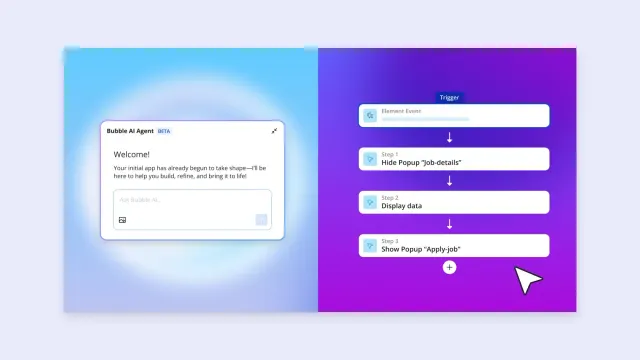
With Bubble, you can generate automation workflows using Bubble AI. Just describe what you need and the Bubble AI Agent (beta) helps you build it step-by-step, in natural language, not code. You’ll see the visual workflow: A user submits a request → routes for approval → creates the server → applies security settings → notifies the requester.
Where to start with automation
You don’t need to automate everything at once. In fact, 88% of IT decision-makers report challenges when scaling automation too quickly. Start with tasks that happen frequently, follow predictable steps, and won’t cause major problems if something goes wrong during testing.
Incident management makes an excellent first automation project. For example, you can tell the Bubble AI Agent, “When monitoring tools detect an issue, create a ticket, assign it based on severity and type, and notify the right team,” and it will generate the workflow in a visual format you can understand and control. Your team will see the ticket within seconds instead of waiting for someone to notice the alert and create it manually.
User provisioning eliminates the back-and-forth emails that slow down onboarding. For example, new employees fill out a request form on their first day. Automation routes it for manager approval, then creates accounts across all necessary systems based on the employee’s role and department.
System health checks run on schedules you define. Instead of someone manually checking disk space, memory usage, and service status every morning, automation runs these checks overnight. If anything falls outside normal ranges, you get alerted immediately.
Backup verification makes sure your backups actually work. Automation schedules backups; regular tests restore procedures and alert you if anything fails.
Change approvals route production changes through proper channels automatically. Developers can submit change requests through a form. Automation will validate that the request meets policy requirements, route it to appropriate approvers based on risk level, and track the entire approval chain.
When choosing your first automation project, look for these characteristics:
- Daily or weekly tasks that deliver faster return on your automation investment due to high frequency
- Processes with straightforward if-this-then-that logic work best initially because they have clear steps
- Tasks with easy verification that lets you quickly confirm whether the automation worked correctly
- Areas where mistakes won’t impact production systems or users to maintain low risk
| Manual Time | Automated Time | Complexity | Mobile Access* | |
|---|---|---|---|---|
| User provisioning | ⏰⏰⏰⏰ 2–4 hours |
⏰ 10 minutes |
⭐ Simple |
✅ Yes |
| Incident ticket creation | ⏰ 15 minutes |
⏰ 30 seconds |
⭐ Simple |
✅ Yes |
| System health checks | ⏰⏰ 45 minutes |
⏰ 2 minutes |
⭐⭐ Moderate |
✅ Yes |
| Backup verification | ⏰⏰⏰⏰ 2 hours |
⏰ 5 minutes |
⭐⭐⭐ Complex |
✅ Yes |
| Production deployments | ⏰⏰⏰⏰⏰⏰ 3 hours |
⏰⏰ 30 minutes |
⭐⭐⭐⭐ Very Complex |
✅ Yes |
Step-by-step implementation plan
Building automation that works requires a clear plan. These five phases take you from choosing your first automation to deploying it in production. Each phase builds on the last to deliver real value while keeping things secure.
With the Bubble AI Agent, you’ll generate working prototypes in minutes during the design phase, then refine and test before going live.
Analyze and map your processes
Pick one high-frequency process to automate first. Document every step someone takes manually: where they get information, what decisions they make, which systems they touch, and who they hand off to next.
Look for bottlenecks where work sits waiting. Maybe provisioning requests wait in email for approvals, or incident tickets go unnoticed for hours after alerts fire. These delays show you where automation delivers the biggest impact.
Define what success looks like with specific metrics. If you’re automating user provisioning, measure how long it takes from request to completion before and after automation. Track error rates to ensure automation doesn’t introduce new problems. Pick two to three metrics you can measure easily.
Design your automation workflow
Start by identifying your workflow’s trigger: the event that kicks things off. This could be a scheduled time (like daily at 2 AM), a system event (monitoring detects high CPU usage), or a user action (someone submits a request form). Then map out what happens next: the checks your workflow needs to perform, any approvals required, the actions to take (calling APIs, sending notifications, updating databases), and how to handle errors when things go wrong.
Next, document the decision points where your workflow branches based on conditions. If a request comes from the finance department, route it to one approver. If it’s from engineering, route it elsewhere. Define what success looks like at each step and what happens when a step fails: Does the workflow retry, alert someone, or roll back changes?
Build these workflows in Bubble's visual editor, where you can see and control each step. The AI Agent can help explain workflow structure, suggest how to handle specific logic, and make individual edits as you refine your automation. You'll see exactly what happens at each step in natural language, not code. This makes it easy to spot gaps, adjust logic, or add new steps as your needs evolve.
Connect your existing tools
Most automation works by connecting tools you already use. For example, your monitoring system detects an issue, then your automation creates a ticket in ServiceNow, pages the on-call engineer through PagerDuty, and posts to Slack so the team knows what’s happening.
Use Bubble’s API Connector to link these systems together. The AI Agent can help you with step-by-step guidance and troubleshooting for complex integrations. You’ll configure each connection once, test it thoroughly, then use it across multiple workflows.
Store credentials securely. Never put API keys or passwords directly in workflows where they’re visible. Use encrypted secrets management that rotates credentials automatically and logs every access.
Build user interfaces and controls
You’ll want to build dashboards so your team can see the status of tasks at a glance: which workflows ran successfully, which failed, and which are currently running. To do so, create self-service portal forms where users can request automated actions directly instead of submitting traditional support tickets.
Set up role-based access so users only see workflows relevant to their job. For example, junior engineers might view automation status but not modify workflows, senior engineers can edit and deploy, and managers see reports but don’t need technical details. These are common patterns that work well for most IT teams, though you’ll want to adjust roles and permissions based on your organization’s specific structure and security requirements.
Test and monitor performance
Start with a small pilot group before rolling automation out broadly. Pick a team that understands you’re testing and can provide detailed feedback. Run the automation alongside manual processes initially so you can compare results.
Monitor success rates and execution times. If a workflow fails repeatedly, investigate why instead of just re-running it. Maybe an API endpoint changed. Or your error handling needs adjustment. Fix root causes rather than treating symptoms.
Gather feedback continuously. Ask users what’s confusing, what’s helpful, and what’s missing. Automation improves over time as you identify edge cases and refine logic based on real-world usage.
Security and governance for automated operations
Automation that touches production systems, creates resources, or accesses sensitive data needs strong security controls. Without proper governance, automation can multiply security risks instead of reducing them.
Identity and access management makes sure that every user and automated process has its own identity you can track and revoke. Never use shared credentials; automation should inherit proper permissions based on who initiated it. For enterprise organizations, integrating your SSO (single sign-on) provider lets users authenticate once through your organization’s identity system. (Note that SSO is only available on Bubble’s Enterprise plan.)
Role-based access controls limit who can create, modify, or execute workflows. Junior team members might run pre-approved automations but can’t edit them. Senior engineers can modify workflows but need manager approval for production deployments. Define these roles based on your organization’s structure and risk tolerance.
Credential management keeps API keys and passwords secure. Store them encrypted, rotate them regularly, and log every access. When workflows need to call external systems, use service accounts with minimum necessary permissions. If an account only needs to read monitoring data, don’t give it permission to modify configurations.
Audit logging creates complete records of automation activity. Track who initiated each workflow, what actions it took, when it ran, and what results it produced. These logs support security investigations, compliance audits, and debugging. With Bubble’s visual workflows, you can trace execution step-by-step in natural language, not code. The AI Agent can help troubleshoot when workflows behave unexpectedly by analyzing your app’s structure and logic.
Approval workflows add governance to sensitive operations. Production changes route through appropriate stakeholders before executing. Automated checks validate that changes meet policy requirements before seeking approvals. This balances speed with oversight — teams move fast while maintaining control.
Bubble’s Security Dashboard scans for vulnerabilities throughout your building process. It includes a secrets scanner that detects leaked API keys anywhere in your app, finds misconfigured privacy rules, and catches security issues before deployment. When the AI Agent creates data types, it automatically generates privacy rules to secure your database.
Bubble maintains SOC 2 Type II compliance and offers a GDPR-compliant Data Processing Addendum (DPA) and hosts infrastructure on Amazon Web Services (AWS), which maintains SOC 2 Type II, CSA CAIQ, and ISO/IEC 27001 certifications. Data is encrypted in transit using TLS and at rest using AES-256 encryption.
Building for web and mobile teams
IT operations happen everywhere, not just at desks. On-call engineers respond to incidents from home. Field technicians coordinate deployments from customer sites. Managers check automation status between meetings. To keep up, you’ll need native iOS and Android apps.
Here’s what native mobile apps enable for IT operations:
- On-call engineers can approve critical changes instantly instead of waiting to reach a laptop for emergency approvals
- Check which automations ran successfully and which need attention from any device for status monitoring
- Review alerts, check system health, and execute approved troubleshooting workflows remotely for incident response
- Technicians update deployment status and trigger next steps from customer locations for field coordination
Building with Bubble delivers web and native mobile apps from one platform and codebase. Build workflows once, and they work identically across devices.
You can generate native iOS and Android UI in minutes with AI generation for mobile (beta), then refine it visually. The shared backend keeps data and workflows consistent: Incident tickets created on mobile appear instantly on web dashboards, and approvals trigger the same workflows regardless of device.
Bubble’s native mobile apps are built on React Native, the same framework used by Amazon, Coinbase, Discord, and others. They include push notifications, in-app purchases (beta), offline read-only access, and native gestures. You can test instantly with dev builds or simulated device preview
Start automating IT operations with Bubble
You’ve learned what to automate, how to secure it, and why visual workflows matter. Now it’s time to build.
Bubble lets you prototype IT automation in minutes using the AI Agent, then deploy production-ready workflows your team can actually understand. No developer required: Just describe what you need to do, and then refine using the visual workflow it generates.
Your first IT automation on Bubble in three steps:
- Pick one frustrating manual process (user provisioning, incident tickets, or system checks work well).
- Start with the free plan to prototype your web automation. Tell the AI Agent what you need and it generates your workflow instantly.
- Connect your existing tools via the API Connector, test with a small group, and deploy.
The Free plan lets you build and test automations. Once you’re ready for custom domains, mobile builds, security testing, or live deployment, you can upgrade to a paid plan. All plans include SOC 2 Type II compliance and GDPR DPA.
Frequently asked questions
How does IT automation differ from orchestration?
IT process automation handles individual tasks like creating a user account or applying a patch. Orchestration coordinates multiple automated tasks with logic, approvals, and error handling — like provisioning a complete environment that requires creating accounts, configuring access, and notifying stakeholders in a specific sequence. With Bubble, you can generate orchestration workflows with the AI Agent or build them visually, seeing each step and decision point in natural language instead of code.
Which IT operations processes should I automate first?
Start with high-frequency tasks that follow predictable steps and have clear success criteria. User provisioning, incident ticket creation, and routine system checks work well as first projects because they happen often, follow consistent patterns, and won’t cause major issues if something goes wrong during testing.
How do I keep automated workflows secure and compliant?
Use role-based access controls to limit who can create and run workflows, require approvals for sensitive operations, store credentials encrypted, and log all automation activity. Bubble’s Security Dashboard includes a secrets scanner that detects leaked API keys anywhere in your app and scans for misconfigured access controls. When the AI Agent creates data types, it automatically generates privacy rules to secure your database.
Can I connect tools like Ansible and ServiceNow to visual workflows?
Yes, Bubble’s API Connector — now its own dedicated tab in the editor — integrates with any tool that has an API. The AI Agent can provide step-by-step guidance for complex integrations. You can trigger Ansible playbooks, create ServiceNow tickets, call monitoring tools, and connect identity providers, all from visual workflows without writing integration code.
How do I measure whether IT operations automation is working?
Track metrics like mean time to resolution for incidents, request fulfillment time for provisioning, and hours saved per automated task. Focus on business impact like faster response times, reduced manual effort, or fewer errors, rather than just technical metrics like workflow execution speed.
Build for as long as you want on the Free plan. Only upgrade when you're ready to launch.
Join Bubble


