
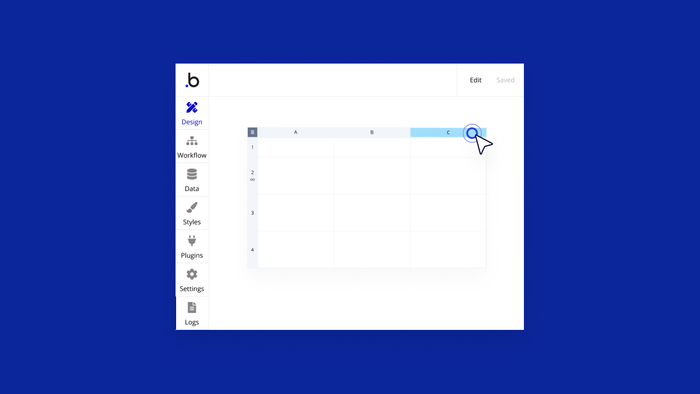
Not a drill: One of our most upvoted ideas on the Bubble ideaboard — the Table element — is officially here.
Until now, if you wanted to add a table (header row, repeating rows of data, the whole nine yards) to your Bubble app, you would have had to jerry-rig a repeating group into acting like one. Bubblers rose to the occasion, customizing repeating groups to the Nth degree for all imaginable use cases. But no longer.
The Table element lets you build beautiful, slick tables in your applications, making it much easier to style and control things whenever you’re blending static content and dynamic data.
How does the Table element work?
Here’s what you need to know:
- The Table element is a new container, similar to a repeating group, except that the Table element repeats a row of cells rather than an individual cell.
- It’s made up of columns, one or more static rows (which are handy for table headers), and a set of repeating rows that you set up to pull in dynamic content.
- Columns neatly align the content in each row’s cells.
- Like with a repeating group, you can specify a fixed number of repeating rows or use a dynamic number of rows to lazy-load data as a user scrolls.
Let’s look at it in action. Here’s an interactive tutorial that explains how the Table element works and shows you how to use one in your app:
To dive even deeper, check out the new Table element entry in the Bubble manual.
When to use tables vs repeating groups
Tables aren’t a replacement for repeating groups. While you no longer need to hack them into pseudo-tables anymore, there are still times when using a repeating group makes the most sense.
Repeating groups are good for displaying list information in a way that’s more flexible, design-wise.
Examples of when to use repeating groups:
- Lists that only require one column
- Card designs
- Masonry grids without multiple headers/columns
- Items in a marketplace, for example
Tables are better for when you need a mix of static and repeating rows, and they’re faster to work with when you want to set up spreadsheet-like structures with rows, multiple columns, and a header.
Examples of when to use the Table element:
- Anywhere you want end-users to be able to see a list of items attached to their user account (order histories, wish lists, etc.)
- Search results
- Pricing tables and product or service listings
- Dashboards
- List of end-users, for admin portals
Here’s why tables are so good for formatting and displaying mixed data:
- Static rows at the top of a table aren’t automatically affected by the element’s data source. Perfect for creating column headers.
- Static rows can be made sticky, meaning that they will remain at the top as you scroll through the records below. Great for building big dashboards!
- Tables make it easy to align multiple pieces of content in a single repeating cell.
- You can add and delete rows and columns in a table, making it easier to make changes to the overall table structure as needed.
- Rows and columns can be copy/pasted. (Always a win!)
We can’t wait to see how you use the Table element — and we think its versatility will open up some new doors for your apps, too.
The best part? You can start building with tables for free right now.
Build for as long as you want on the Free plan. Only upgrade when you're ready to launch.
Join Bubble